
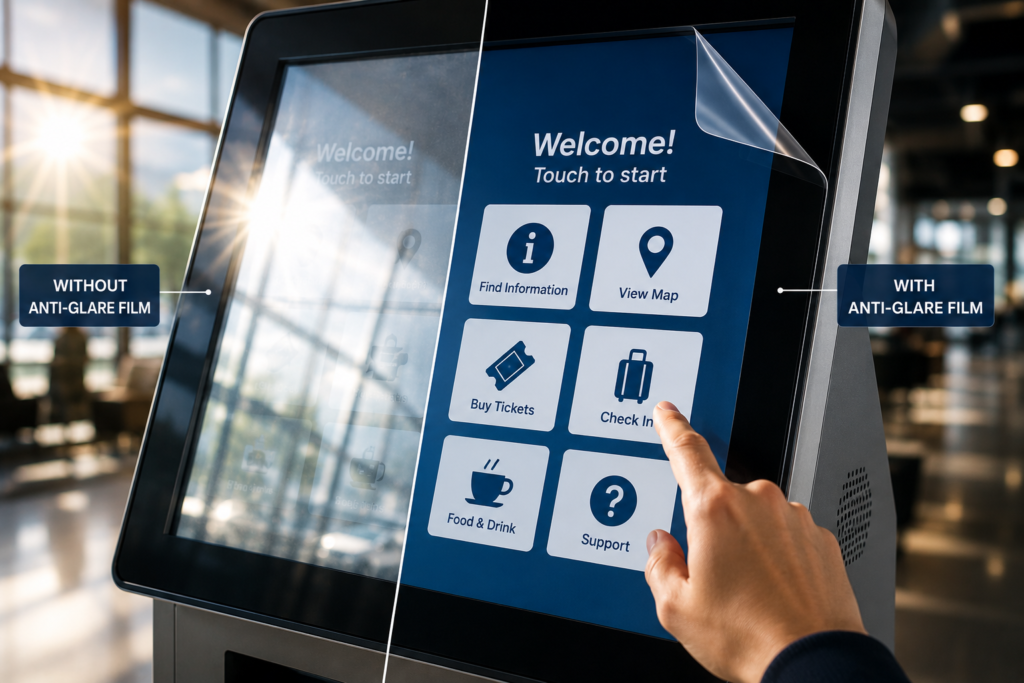
 Can Anti-Glare Film Be Used on Touchscreens?
Yes, anti-glare film can be used on many touchscreens.
However, touchscreen applications need to be reviewed carefully because not every screen, surface, or installation environment is the same.
Touchscreens are now used everywhere. Customers tap them at kiosks, restaurants, gas pumps, ATMs, hotels, airports, museums, retail stores, payment terminals, transportation stations, and control panels.
That means the screen needs to do two jobs at once:
It needs to be easy to see.
And it needs to be easy to touch.
When glare gets in the way, the whole interaction becomes harder. Users may struggle to read buttons, menus, maps, payment prompts, ticketing instructions, product options, or confirmation screens. As a result, they slow down, tap the wrong area, ask for help, or abandon the interaction entirely.
Anti-glare film can help reduce reflections on touchscreen surfaces so the interface is easier to read in bright environments.
But before choosing film, you need to understand the touchscreen type, surface material, use case, and installation conditions.
This guide explains where anti-glare film works on touchscreens, what to check before ordering, and how to choose the right option.
Why Touchscreen Glare Is a Bigger Problem Than Regular Screen Glare
A regular display only needs to be readable.
A touchscreen needs to be readable and usable.
That makes glare more disruptive.
If a customer cannot clearly see the screen, they may not know where to tap. If they cannot see the button labels, payment prompts, form fields, or menu options, the interaction becomes slower and less accurate.
Touchscreen glare can affect:
- Button visibility
- Menu readability
- Payment prompts
- QR codes
- Maps and directions
- Product selectors
- Ordering screens
- Ticketing instructions
- ATM transaction prompts
- Gas pump options
- Form fields
- Confirmation screens
- Accessibility options
A touchscreen can have great software, a bright display, and a clean interface. However, if reflections block the screen, users still struggle.
That is why surface visibility matters.
How Anti-Glare Film Helps Touchscreens
Anti-glare film helps reduce sharp reflections on the display-facing surface.
A glossy touchscreen can reflect sunlight, ceiling lights, windows, vehicles, storefront glass, people, and surrounding objects. Those reflections compete with the digital interface.
Anti-glare film helps soften those reflections so the screen content becomes easier to see.
This can improve touchscreen usability in environments with:
- Direct sunlight
- Overhead lighting
- Storefront windows
- Outdoor reflections
- Bright floors
- Vehicle reflections
- Museum lighting
- Airport terminal lighting
- Restaurant lighting
- Protective glass
- Acrylic overlays
- Public-facing kiosks
Anti-glare film does not make the touchscreen brighter. Instead, it helps reduce surface glare so the existing screen can be easier to read.
That distinction is important.
If the screen is too dim, a brighter display may be needed. However, if the screen is reflecting light, anti-glare film may be the better first step.
Common Touchscreen Applications for Anti-Glare Film
Anti-glare film can support many interactive display applications.
Kiosks
Kiosks are one of the most common touchscreen use cases. Anti-glare film can help improve visibility on ordering kiosks, hotel check-in kiosks, ticketing kiosks, wayfinding systems, healthcare check-in screens, and self-service terminals.
Gas Pump Touchscreens
Gas pump screens often sit outdoors under bright canopy lighting, direct sunlight, vehicle reflections, and glossy protective covers. Anti-glare film can help customers read payment prompts, fuel options, loyalty screens, and confirmation messages.
ATM Touchscreens
ATM screens need clear visibility for secure transactions. Anti-glare film can help reduce reflections on walk-up ATMs, drive-up ATMs, banking kiosks, and financial service terminals.
Restaurant Ordering Screens
Menu boards and ordering kiosks must be clear so customers can read items, prices, modifiers, upsells, and payment prompts. Anti-glare film can help improve the ordering experience.
Retail Touchscreens
Retail touchscreens are often used for product selectors, digital catalogs, loyalty signups, interactive displays, and endless aisle systems. Anti-glare film can help make those screens easier to use near windows, storefront glass, and bright retail lighting.
Museum Touchscreens
Museum exhibits often use touchscreens for storytelling, timelines, interactive maps, educational media, and visitor engagement. Anti-glare film can help visitors focus on the content instead of reflections.
Transportation Kiosks
Transportation displays often include ticketing machines, transit maps, check-in kiosks, and public information screens. Anti-glare film can help travelers read instructions faster in bright terminals and outdoor platforms.
Control Panels
Control rooms and commercial control environments use touch-enabled panels, dashboards, and operator screens. Anti-glare film can help improve visibility during long-duration use.
Touchscreen Types Matter
Before applying anti-glare film to a touchscreen, it helps to know what type of touchscreen you have.
Different technologies respond differently to surface layers.
Common touchscreen types include:
- Capacitive touchscreens
- Resistive touchscreens
- Infrared touchscreens
- Optical touchscreens
- Projected capacitive screens
- Touchscreens behind protective glass
- Touchscreens behind acrylic overlays
You do not always need to know every technical detail before requesting a quote. However, if you have the display model or touchscreen type, send it.
If you do not know, send photos and describe how the screen is used.
The more information you provide, the easier it is to recommend the right direction.
Glass Touchscreens vs. Acrylic Overlays
Touchscreens may have different surface materials.
Some users touch the display glass directly. Others interact with a screen behind protective glass or acrylic.
That surface detail matters.
Glass Touchscreens
Glass is common on many touchscreen displays. It is stable, durable, and smooth. However, it can reflect strongly under bright light.
Anti-glare film may help reduce reflections on glass touchscreen surfaces, depending on the application.
Acrylic Touchscreen Covers
Acrylic is common in kiosks, protective covers, outdoor display faces, and custom fabricated panels.
However, acrylic can reflect heavily and scratch more easily than glass.
If the touchscreen surface includes acrylic, review the Anti-Glare Film for Acrylic Panels page before ordering.
Acrylic needs careful cleaning and handling before film installation.
Will Anti-Glare Film Affect Touchscreen Performance?
The correct film and installation approach are important.
In many touchscreen applications, anti-glare film can be used successfully. However, touchscreen performance depends on the screen type, film selection, surface condition, and installation quality.
Potential factors include:
- Touchscreen technology
- Film thickness
- Surface material
- Display sensitivity
- Installation quality
- Edge alignment
- Bubbles or dust
- Whether users touch the film directly
- Outdoor exposure
- Cleaning and maintenance
This is why we always recommend identifying the touchscreen application before quoting film.
For best results, send photos, model information if available, and details about whether the screen is touch-enabled.
You can submit that information through the Request an Anti-Glare Film Quote page.
Standard or Ultra Clear Anti-Glare Film for Touchscreens?
Touchscreens can use either Standard Anti-Glare Film or Ultra Clear Anti-Glare Film, depending on the application.
Use Standard Anti-Glare Film When:
- Glare reduction is the main priority
- The screen is utility-focused
- The interface is mostly text, buttons, prompts, or menus
- The display is outdoors or under harsh lighting
- The screen is used for payment, ordering, ticketing, or basic navigation
- Cost-effective visibility improvement matters most
Standard film is often a strong fit for:
- Gas pump touchscreens
- ATM touchscreens
- Ordering kiosks
- Parking payment screens
- Public information kiosks
- Outdoor self-service terminals
Use Ultra Clear Anti-Glare Film When:
- Image clarity matters
- The display is premium or customer-facing
- The screen shows video, product images, branding, or exhibit content
- The interface is used in retail, museums, hospitality, or corporate spaces
- The screen needs a cleaner, sharper appearance
- Visitor or customer experience is a top priority
Ultra Clear film is often a strong fit for:
- Museum touchscreens
- Retail product selectors
- Corporate lobby screens
- Luxury showroom displays
- Premium hospitality kiosks
- High-end interactive displays
If the display needs to look polished, Ultra Clear is usually the better choice. If the display needs to be readable in harsh conditions, Standard may be the practical move.
Anti-Glare Film for Outdoor Touchscreens
Outdoor touchscreens face some of the toughest visibility conditions.
Sunlight, vehicle reflections, pavement glare, weather covers, and changing viewing angles can make the screen difficult to read.
Outdoor touchscreen applications include:
- Gas pump screens
- Parking kiosks
- Transit ticketing machines
- Outdoor wayfinding displays
- EV charger screens
- Drive-thru ordering displays
- Outdoor payment terminals
- Campus information kiosks
- Public service kiosks
- Walk-up ATM screens
For these applications, Anti-Glare Film for Outdoor Displays can help reduce reflections and improve readability.
However, outdoor installations need extra planning.
You should confirm:
- Exposure to sunlight
- Weather protection
- Surface type
- Touchscreen use
- Cleaning method
- Edge conditions
- Installation access
- Worst time of day for glare
Outdoor touchscreen projects are not the place for “we’ll eyeball it.” That is how the screen ends up looking like a haunted mirror.
Anti-Glare Film for Indoor Touchscreens
Indoor touchscreens can also have serious glare problems.
Common indoor glare sources include:
- Overhead lights
- Windows
- Glass walls
- Polished floors
- Pendant lights
- Retail lighting
- Museum spotlights
- Bright lobbies
- Nearby screens
- Glossy acrylic covers
Indoor touchscreen applications include:
- Retail kiosks
- Museum interactives
- Hotel check-in screens
- Healthcare check-in kiosks
- Restaurant ordering kiosks
- Corporate lobby displays
- Visitor management systems
- Conference room panels
- Wayfinding screens
- Product configurators
Indoor glare may not be as obvious as outdoor sunlight, but it can still make screens harder to use.
Anti-Glare Film vs. Replacing the Touchscreen
If a touchscreen is hard to read, replacing the display may seem like the obvious solution.
Sometimes replacement is necessary.
However, if the screen still works and the issue is surface reflection, anti-glare film may be more practical.
| Problem | Replacing Touchscreen | Adding Anti-Glare Film |
|---|---|---|
| Screen is too dim | May help | Does not increase brightness |
| Surface reflects light | May not solve it | Helps reduce glare |
| Protective glass reflects | Still possible | Helps reduce reflections |
| Touchscreen still works | Expensive upgrade | Easier retrofit |
| Acrylic cover causes glare | Replacement may be involved | Film may improve surface visibility |
| Public-facing wear | New screen still exposed | Adds protective layer |
| Multi-location rollout | Higher cost | More practical |
Before replacing the touchscreen, confirm whether the issue is screen performance or surface glare.
If the problem is glare, anti-glare film may be the smarter first move.
Does Anti-Glare Film Protect Touchscreens?
Anti-glare film can also help protect touchscreen surfaces from everyday wear.
Depending on the application, it may help protect against:
- Fingerprints
- Smudges
- Light scratches
- Daily handling
- Cleaning abrasion
- Public-facing use
- Surface wear
- Minor contact marks
This can be especially useful for public touchscreens that are used all day.
However, anti-glare film should not be treated as armor. It is not a replacement for proper display protection, impact protection, or rugged hardware.
It is a visibility and surface protection layer.
Installation Considerations for Touchscreens
Touchscreen installation quality matters.
A poor installation can affect appearance, usability, and long-term performance.
Before installation, the touchscreen surface should be:
- Clean
- Smooth
- Dry
- Free of dust
- Free of oils
- Free of fingerprints
- Free of old adhesive
- Free of deep scratches
- Accurately measured
- Accessible for application
Also, installers should avoid covering:
- Sensors
- Cameras
- Buttons
- Speakers
- Bezels that affect touch
- Edge areas needed for screen function
- Ports or access panels
For large touchscreens, public kiosks, outdoor screens, acrylic panels, or multi-location projects, professional installation may be recommended.
Review the Anti-Glare Film Installation Guide for more planning details.
What Measurements Are Needed?
To quote anti-glare film for a touchscreen, send the exact surface size where the film will be applied.
We typically need:
- Width
- Height
- Quantity
- Surface type
- Touchscreen or non-touchscreen confirmation
- Glass or acrylic
- Indoor or outdoor use
- Standard or Ultra Clear preference
- Photos of the touchscreen
- Photos showing glare
- Display model if available
- Shipping location
- Desired timeline
If there are multiple screens, list each size separately.
Example:
| Touchscreen Application | Size | Quantity |
| Ordering kiosk | 21″ × 14″ | 12 |
| Gas pump touchscreen | 10″ × 7″ | 40 |
| Museum interactive | 32″ × 18″ | 4 |
Accurate measurements help avoid fit issues, delays, and wasted material.
What Photos Should You Send?
Photos make the quote process faster.
Send:
- Straight-on photo of the touchscreen
- Close-up of the surface
- Photo showing the glare issue
- Photo of the frame or bezel
- Side-angle photo
- Full installation area photo
- Photo of touchscreen in use if possible
- Photo with a tape measure if possible
For outdoor touchscreens, try to send a photo during the worst glare condition.
That gives a better sense of the actual visibility issue.
Common Mistakes to Avoid
Forgetting to Mention Touchscreen Use
Always confirm whether the display is touch-enabled before ordering film.
Measuring the Wrong Area
Measure the surface where the film will be applied, not always the full housing.
Ignoring Acrylic Covers
Many touchscreens are behind acrylic or protective glass. The cover may be the source of the glare.
Choosing the Wrong Film Type
Standard film is best for practical glare reduction. Ultra Clear film is better when premium appearance matters.
Skipping Surface Prep
Dust, oils, fingerprints, and old adhesive can affect installation quality.
Assuming Film Increases Brightness
Anti-glare film reduces reflections. It does not increase screen brightness.
Not Sending Photos
Photos help identify the surface, glare source, bezel, and installation conditions.
Future Trends for Touchscreen Visibility
Touchscreens are becoming more common in public spaces.
You can already see this happening with:
- Self-service restaurants
- Smart city kiosks
- EV chargers
- Airport ticketing
- Museum interactives
- Retail product selectors
- Hotel check-in systems
- Gas pump media screens
- Healthcare check-in terminals
- Transportation maps
- Outdoor payment displays
As touchscreens move into brighter and more demanding environments, visibility will become even more important.
Future touchscreen projects will need to consider:
- Glare reduction
- Surface protection
- Outdoor readability
- Touch compatibility
- Acrylic vs. glass surfaces
- Cleaning durability
- Premium visual appearance
- Multi-location consistency
The best touchscreen is not just the one with the best software. It is the one people can actually see and use.
Radical concept, apparently.
Final Takeaway
Anti-glare film can be used on many touchscreens, but the application should be reviewed before ordering.
The right film depends on the touchscreen type, surface material, lighting environment, image clarity needs, and whether the screen is indoors or outdoors.
For public-facing touchscreens, kiosks, gas pumps, ATMs, ordering screens, museums, transportation displays, and control panels, anti-glare film can help reduce reflections, improve readability, and protect the surface from daily handling.
To get started, send your width, height, quantity, surface type, touchscreen details, and photos through the Request an Anti-Glare Film Quote page.
FAQ
Can anti-glare film be used on touchscreens?
Yes. Anti-glare film can be used on many touchscreens depending on the screen type, surface material, and installation conditions.
Will anti-glare film affect touchscreen performance?
It depends on the touchscreen type, film, and installation quality. Touchscreen applications should be reviewed before ordering.
Can anti-glare film be used on outdoor touchscreens?
Yes, depending on the surface and exposure. Outdoor kiosks, gas pumps, ATMs, parking screens, and ticketing machines are common applications.
Can anti-glare film be used on acrylic touchscreen covers?
Yes. Anti-glare film can be used on many acrylic panels and protective covers, but acrylic requires careful cleaning and handling.
Should I choose Standard or Ultra Clear Anti-Glare Film for a touchscreen?
Use Standard when practical glare reduction is the main priority. Use Ultra Clear when image clarity and premium appearance matter more.
Does anti-glare film make touchscreens brighter?
No. Anti-glare film does not increase brightness. It reduces surface reflections so the screen can be easier to read.
What information do I need for a touchscreen quote?
Send width, height, quantity, surface type, touchscreen status, indoor/outdoor use, film preference, photos, and display model if available.
Do touchscreen film projects need professional installation?
Some small projects may be customer-installed. However, large touchscreens, outdoor kiosks, acrylic panels, premium displays, or multi-location projects may benefit from professional installation.
Sources
OSHA workstation guidance recommends arranging lighting to avoid reflected glare on display screens:
https://www.osha.gov/etools/computer-workstations/workstation-environment
OSHA monitor guidance notes that monitor angle can create glare from ceiling lighting and that a glare screen may be needed:
https://www.osha.gov/etools/computer-workstations/components/monitors
3M screen protection products reference glare and screen scratching prevention:
https://www.3m.com/3M/en_US/privacy-screen-protectors-us/
Screen Solutions International:
https://ssidisplays.com/