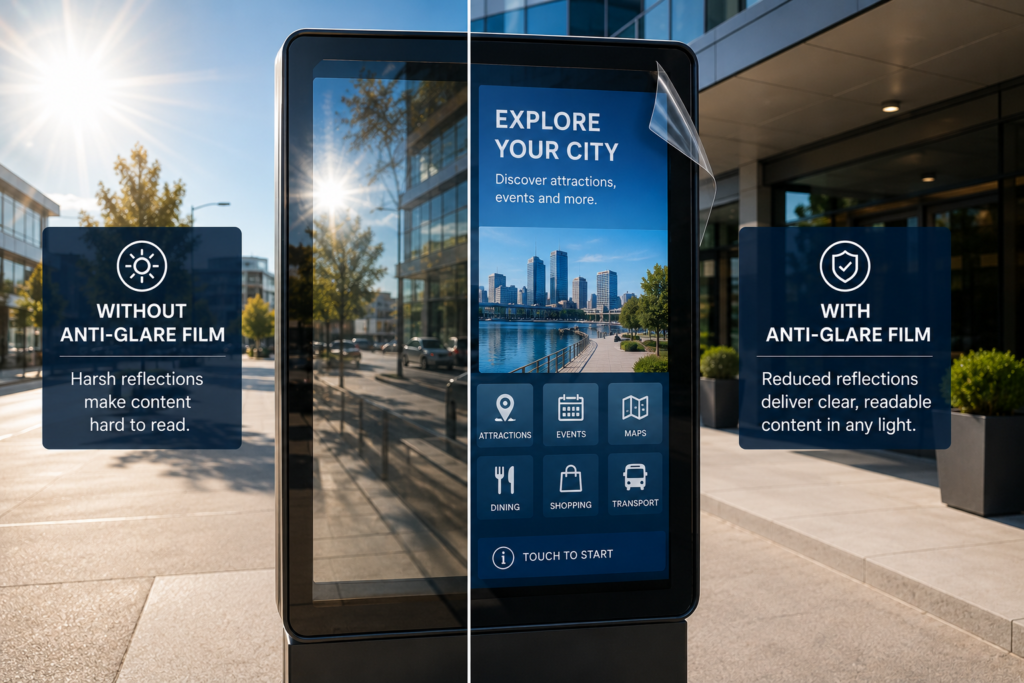
 How to Reduce Glare on Outdoor Digital Displays
Outdoor digital displays are built to be seen.
They promote products, guide visitors, display schedules, support payments, show menus, provide public information, and help customers interact with businesses in real time.
However, outdoor displays face one major visibility problem:
Glare.
Even a high-brightness screen can become difficult to read when sunlight reflects off the surface. In many cases, the display itself is not the problem. The real problem is the glass, acrylic, protective cover, touchscreen, or glossy surface in front of the screen.
That is why businesses looking to improve outdoor screen visibility need to think beyond brightness.
To reduce glare on outdoor digital displays, you need the right combination of display placement, brightness, surface treatment, anti-glare film, installation planning, and regular maintenance.
This guide breaks down the practical ways to reduce glare so your outdoor screens stay easier to read in real-world lighting conditions.
Why Outdoor Digital Displays Have Glare Problems
Outdoor displays operate in conditions that are hard to control.
Unlike indoor screens, outdoor displays deal with direct sunlight, changing sun angles, reflected light, weather covers, vehicle glare, pavement reflections, glass reflections, and wide viewing angles.
Common glare sources include:
- Direct sunlight
- Reflected sunlight
- Pavement and concrete
- Vehicle reflections
- Storefront windows
- Protective glass
- Acrylic covers
- Glossy screen surfaces
- Outdoor enclosure windows
- Bright surrounding buildings
- Changing viewing angles
- Weatherproof display covers
Because these conditions change throughout the day, a display that looks clear in the morning may become difficult to read in the afternoon.
That is why glare control needs to be part of the display plan from the beginning.
Start With the Real Problem: Brightness or Reflection?
Before choosing a solution, identify the actual problem.
Ask this first:
Is the screen too dim, or is the screen reflecting light?
Those are different problems.
If the screen is too dim, a higher-brightness display may be needed.
However, if the screen is bright enough but the surface reflects sunlight, glass, vehicles, or surroundings, then the problem is surface glare.
In that case, Anti-Glare Film may be a smarter first step than replacing the entire display.
Here is the quick breakdown:
| Problem | Likely Cause | Possible Solution |
|---|---|---|
| Screen looks dark in daylight | Low brightness | Higher-brightness display |
| Screen has bright reflections | Surface glare | Anti-glare film or surface treatment |
| Screen is behind acrylic | Protective cover reflection | Anti-glare film for acrylic |
| Touchscreen buttons are hard to see | Reflections on touch surface | Anti-glare touchscreen film |
| Display is readable from one angle only | Viewing angle and glare | Placement and surface treatment |
| Screen is washed out at certain times | Sun angle | Repositioning, shading, anti-glare film |
The goal is not to guess. The goal is to diagnose the visibility issue correctly.
Use Anti-Glare Film for Outdoor Display Surfaces
One of the most practical ways to reduce surface reflections is to apply Anti-Glare Film for Outdoor Displays.
Anti-glare film helps reduce mirror-like reflections on display-facing surfaces such as glass, acrylic, protective covers, and touchscreen panels.
It can be used on outdoor display applications such as:
- Outdoor digital signage
- Public information screens
- Kiosks
- Gas pump screens
- ATM screens
- Menu boards
- Transportation displays
- Parking payment screens
- EV charger displays
- Outdoor retail displays
- Wayfinding displays
- Drive-thru screens
Anti-glare film does not make the display brighter. Instead, it reduces reflections so the existing brightness can be more useful.
That distinction matters because many outdoor visibility issues are caused by glare, not display failure.
Choose the Right Film: Standard or Ultra Clear
Not every outdoor screen needs the same film.
Some displays need maximum practical glare reduction. Others need glare reduction while preserving a more premium visual appearance.
Standard Anti-Glare Film
Standard Anti-Glare Film is usually the best starting point for practical outdoor glare problems.
It works well for:
- Utility screens
- Public-facing displays
- Outdoor kiosks
- Gas pumps
- ATMs
- Drive-thru screens
- Parking payment screens
- Transportation displays
- Menu boards
- Basic outdoor signage
This option is ideal when readability matters more than premium visual polish.
Ultra Clear Anti-Glare Film
Ultra Clear Anti-Glare Film is better when image clarity and appearance matter more.
It may be the better choice for:
- Premium retail displays
- Outdoor showroom screens
- Hospitality displays
- Museum-adjacent outdoor screens
- Luxury storefront signage
- Customer-facing brand displays
- High-end touchscreens
If the screen displays product photography, video, branding, or premium visuals, Ultra Clear may be worth considering.
Improve Display Placement
Placement has a major impact on glare.
Even the best outdoor display can struggle if it directly faces the sun or reflects a bright surface behind the viewer.
When possible, avoid placing displays where they face:
- Direct afternoon sun
- Bright white pavement
- Reflective glass buildings
- Parking lots full of vehicles
- Large windows
- Highly reflective walls
- Water surfaces
- Bright metal structures
Better placement can reduce the amount of light hitting the display surface.
Good placement strategies include:
- Angle the display away from direct sun
- Avoid facing reflective buildings
- Place screens under shade or canopies
- Use landscape elements to reduce reflected light
- Avoid glossy surroundings behind the viewer
- Consider viewer position at different times of day
- Test the display during peak glare hours
A display should not just look good when installed. It should work when people actually use it.
Add Shade When Possible
Shade can reduce direct sunlight and improve outdoor display readability.
Depending on the project, shading may come from:
- Canopies
- Awnings
- Overhangs
- Architectural structures
- Display hoods
- Recessed enclosures
- Kiosk roof structures
- Landscape shade
- Angled mounting
- Screen shrouds
However, shade does not always solve the problem completely.
Even shaded screens can reflect bright surroundings. For example, a gas pump screen under a canopy can still reflect vehicles, concrete, and daylight from the open sides.
That is why shade and anti-glare film often work well together.
Use the Right Brightness Level
Outdoor displays usually need higher brightness than indoor displays.
Brightness is commonly measured in nits. Outdoor displays often require higher nit ratings because they compete with sunlight and high ambient light.
However, brightness alone does not eliminate glare.
A bright display with a highly reflective surface can still be hard to see.
Think of brightness and glare control as a pair:
- Brightness helps the screen output more visible light
- Anti-glare treatment helps reduce reflected light from the surface
If you only increase brightness but ignore reflection, the screen may still struggle.
Reduce Glare on Outdoor Touchscreens
Outdoor touchscreens are especially vulnerable because users need to see the interface clearly before they can interact.
Common outdoor touchscreen applications include:
- Ticketing kiosks
- Payment terminals
- Parking kiosks
- Gas pump touchscreens
- ATM touchscreens
- Wayfinding displays
- EV charger screens
- Outdoor ordering kiosks
- Transit kiosks
- Public information screens
If glare blocks buttons, prompts, maps, menus, or payment instructions, users slow down and make more mistakes.
Anti-Glare Film for Touchscreens can help improve visibility, but touchscreen projects need review before ordering.
Before selecting film, confirm:
- Is the screen touch-enabled?
- Is the surface glass or acrylic?
- Will users touch the film directly?
- Is the screen outdoors full-time?
- Is clarity or glare reduction more important?
- Is the display behind protective glass?
- Is the touchscreen capacitive or resistive?
If you are not sure, send photos and display details through the Request an Anti-Glare Film Quote page.
Reduce Glare on Acrylic Display Covers
Acrylic is common in outdoor display projects because it is lightweight, durable, and easier to fabricate than glass.
However, acrylic can reflect strongly under sunlight.
Acrylic is often used for:
- Kiosk face panels
- Outdoor display covers
- Menu board covers
- Protective screen windows
- EV charger display covers
- Transit display covers
- Gas pump screen covers
- Custom clear panels
Anti-Glare Film for Acrylic Panels can help reduce reflections on acrylic surfaces while also adding a protective layer.
Still, acrylic needs careful handling.
Before installation, acrylic should be clean, smooth, dry, and free of dust, oils, scratches, and old adhesive. Also, because acrylic can scratch more easily than glass, it should be cleaned with appropriate materials and handled carefully.
Outdoor Kiosks: A Major Glare Challenge
Outdoor kiosks often combine every glare problem into one system.
They may include:
- Touchscreens
- Protective glass
- Acrylic covers
- Direct sunlight
- Outdoor placement
- Public use
- Multiple viewing angles
- Payment screens
- Wayfinding interfaces
- Advertising displays
That makes Anti-Glare Film for Kiosks one of the strongest outdoor applications.
Kiosk glare can affect:
- Ordering speed
- Payment completion
- Map visibility
- Touchscreen accuracy
- User confidence
- Customer satisfaction
- Accessibility
- Staff support requests
If a kiosk is hard to see, users may avoid it completely. That defeats the entire purpose of self-service technology.
Outdoor Menu Boards and Drive-Thru Displays
Outdoor menu boards need to be clear fast.
Customers are often ordering from vehicles, standing in sunlight, or viewing the display from a fixed angle. Therefore, glare can directly affect ordering speed and customer confidence.
Anti-Glare Film for Menu Boards can help reduce reflections on:
- Drive-thru screens
- Outdoor ordering displays
- Restaurant menu boards
- Food truck displays
- Patio menu displays
- Concession screens
- Digital specials boards
- Customer-facing order screens
A menu board should make ordering easier, not turn into a mirror with fries in the background.
If the display shows food photography or premium branding, consider Ultra Clear. If the main issue is practical readability, Standard Anti-Glare Film is usually the better starting point.
Gas Pumps, ATMs, and Payment Screens
Outdoor transaction screens must be readable because customers use them to complete a task.
For gas pump screens, glare can affect:
- Payment prompts
- Fuel instructions
- Loyalty screens
- Receipt options
- Video ads
- Touchscreen buttons
- Confirmation messages
For ATM screens, glare can affect:
- PIN prompts
- Transaction options
- Balance inquiries
- Withdrawal screens
- Deposit instructions
- Drive-up visibility
- Receipt prompts
For both applications, practical visibility matters most.
Anti-glare film can help improve readability without replacing the entire screen system.
Transportation Displays and Outdoor Wayfinding
Outdoor transportation displays need to be readable quickly.
Travelers and commuters may need route information, schedules, maps, alerts, gates, platforms, pickup zones, and ticketing instructions under time pressure.
Anti-Glare Film for Transportation Displays can help reduce reflections on:
- Outdoor platform screens
- Bus stop displays
- Ticketing kiosks
- Parking payment terminals
- Shuttle screens
- Transit maps
- Airport curbside displays
- Public information signs
- Train station displays
- Wayfinding screens
When transportation screens are easier to read, people move through the space more confidently.
Keep the Surface Clean
Dirt, fingerprints, dust, rain residue, old adhesive, and scratches can make glare worse.
Outdoor displays should be cleaned and maintained regularly because surface contamination can scatter light and reduce visibility.
Maintenance should include:
- Cleaning fingerprints and smudges
- Removing dust and debris
- Checking for scratches
- Inspecting film edges
- Removing old adhesive residue
- Avoiding harsh cleaners on acrylic
- Checking for moisture issues
- Reviewing visibility at different times of day
A dirty screen with anti-glare film is still a dirty screen. Clean surfaces win.
Plan Installation Correctly
Anti-glare film works best when installation is planned properly.
For outdoor displays, installation should account for:
- Surface material
- Outdoor exposure
- Dust and wind
- Temperature conditions
- Touchscreen status
- Glass or acrylic type
- Panel size
- Edge clearance
- Public-facing use
- Installation access
- Weather timing
For larger displays, touchscreens, public kiosks, acrylic panels, or multi-location projects, professional installation may be recommended.
You can review the full Anti-Glare Film Installation Guide for prep, measurement, and surface planning.
What Measurements Are Needed?
To quote outdoor anti-glare film correctly, send the exact size of the surface where the film will be applied.
We typically need:
- Width
- Height
- Quantity
- Surface type
- Touchscreen or non-touchscreen
- Indoor, outdoor, or covered outdoor use
- Standard or Ultra Clear preference
- Photos of the display
- Photos showing the glare issue
- Shipping location
- Desired timeline
For multi-location projects, send a size and quantity schedule.
Example:
| Application | Size | Quantity |
| Outdoor kiosk touchscreen | 21″ × 14″ | 12 |
| Drive-thru menu screen | 48″ × 27″ | 6 |
| Gas pump display | 10″ × 7″ | 40 |
Accurate measurements make the quoting process faster and cleaner.
What Photos Should You Send?
Photos help confirm the surface, lighting, glare source, and installation conditions.
Send:
- Straight-on photo of the display
- Close-up of the surface
- Photo showing the glare problem
- Side-angle photo
- Photo of the frame or bezel
- Full installation area photo
- Outdoor photo during worst glare conditions
- Photo with a tape measure if possible
Good photos prevent guessing. Guessing is where projects start wearing clown shoes.
Common Mistakes to Avoid
Replacing the Display Before Diagnosing Glare
If the display still works, first confirm whether the real problem is surface reflection.
Assuming Brightness Solves Everything
A brighter screen can help, but glare can still block visibility.
Ignoring Acrylic Covers
Many outdoor screens are protected by acrylic or glass covers. The cover may be causing the reflection.
Forgetting Touchscreen Details
Touchscreens need review before film selection.
Measuring the Housing Instead of the Surface
Measure the actual area where the film will be applied.
Skipping Installation Prep
Dust, oils, old adhesive, and scratches can affect the final result.
Choosing the Wrong Film Type
Use Standard for practical visibility. Use Ultra Clear when clarity and premium presentation matter more.
Future Trends in Outdoor Display Visibility
Outdoor displays are expanding fast.
Businesses are adding screens to:
- EV charging stations
- Outdoor kiosks
- Drive-thru lanes
- Smart city signage
- Transportation hubs
- Parking systems
- Fuel stations
- Retail storefronts
- Stadiums and venues
- Public information networks
As these screens become more common, glare control will become more important.
In the future, successful outdoor display projects will not only specify brightness. They will also consider surface reflection, touchscreen usability, protective covers, anti-glare film, and viewer conditions.
The best outdoor screens will not just be brighter.
They will be easier to see.
Final Takeaway
To reduce glare on outdoor digital displays, start by identifying whether the problem is screen brightness or surface reflection.
If the screen is too dim, a brighter display may help. However, if sunlight, glass, acrylic, pavement, vehicles, or surrounding reflections are blocking visibility, anti-glare film may be the smarter first step.
For outdoor displays, kiosks, gas pumps, ATMs, menu boards, transportation screens, and touchscreens, anti-glare film can help reduce reflections, improve readability, and protect display-facing surfaces.
Send your screen size, surface type, quantity, and photos through the Request an Anti-Glare Film Quote page and we’ll help recommend the right option.
FAQ
What is the best way to reduce glare on outdoor digital displays?
The best approach is to combine proper display placement, appropriate brightness, shade when possible, surface cleaning, and anti-glare film for the display-facing surface.
Does anti-glare film make an outdoor display brighter?
No. Anti-glare film does not increase brightness. It reduces surface reflections so the existing display can be easier to see.
Can anti-glare film be used on outdoor touchscreens?
Yes, depending on the touchscreen type and surface. Outdoor touchscreen applications should be reviewed before ordering.
Can anti-glare film be used on acrylic display covers?
Yes. Anti-glare film can be used on many acrylic display covers, kiosk panels, and protective outdoor surfaces.
Should I replace my outdoor display or add anti-glare film?
If the display is too dim or failing, replacement may be needed. If the screen is reflecting light, anti-glare film may be the better first step.
Is Standard or Ultra Clear better for outdoor displays?
Standard Anti-Glare Film is often best for practical outdoor glare reduction. Ultra Clear may be better for premium outdoor retail, hospitality, or brand-facing displays.
What measurements are needed for an outdoor display quote?
Send width, height, quantity, surface type, touchscreen status, indoor/outdoor use, and photos showing the glare issue.
Sources
OSHA workstation guidance recommends arranging lighting to avoid reflected glare on display screens:
https://www.osha.gov/etools/computer-workstations/workstation-environment
OSHA monitor guidance notes that monitor angle can create glare from ceiling lighting and that a glare screen may be needed:
https://www.osha.gov/etools/computer-workstations/components/monitors
3M screen protection products reference glare and screen scratching prevention:
https://www.3m.com/3M/en_US/privacy-screen-protectors-us/
Screen Solutions International:
https://ssidisplays.com/