 Anti-Glare Film for Acrylic vs. Glass: What’s the Difference?
Glass and acrylic are two of the most common surfaces used in commercial display projects.
They protect screens, cover kiosks, frame museum exhibits, shield menu boards, support signage, and create clear viewing panels for public-facing displays.
However, both surfaces can create glare.
A bright display may still be difficult to see if the surface in front of it reflects sunlight, overhead lights, storefront windows, vehicles, museum spotlights, or glossy floors. In many cases, the problem is not the display itself. The problem is the glass or acrylic layer over the display.
That is where anti-glare film can help.
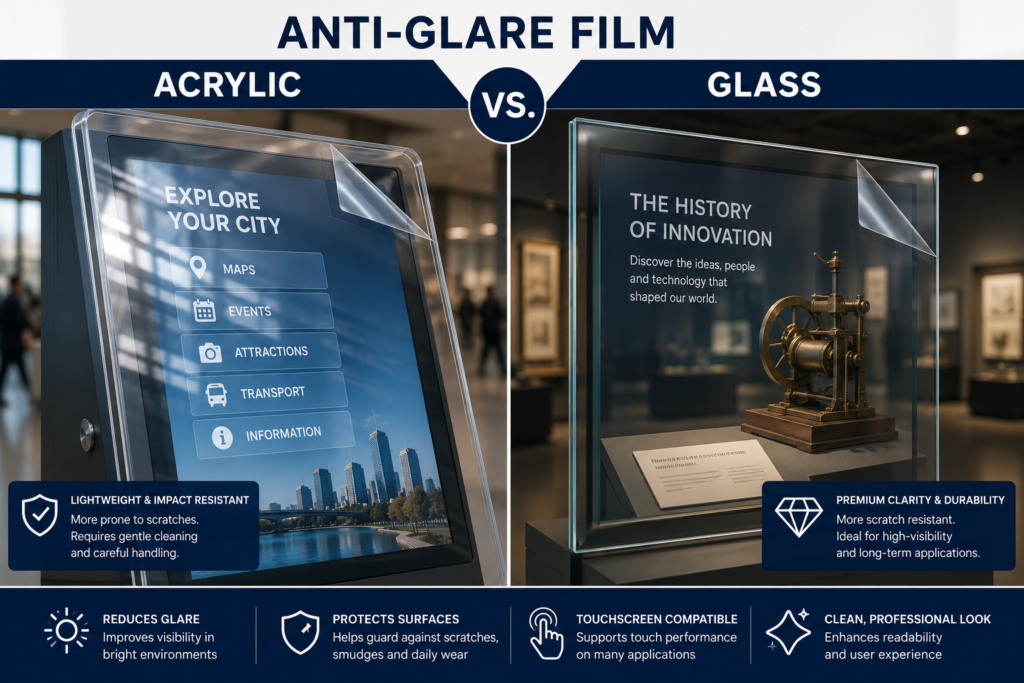
Anti-glare film can reduce reflections on many glass and acrylic surfaces, but the two materials behave differently. Glass is harder and more scratch-resistant. Acrylic is lighter and easier to fabricate, but it scratches more easily and can attract dust from static.
Because of that, choosing anti-glare film for acrylic vs. glass requires slightly different planning.
This guide explains the difference between acrylic and glass surfaces, where anti-glare film works best, and what details you need before requesting a quote.
Why Glass and Acrylic Create Glare
Glass and acrylic are both clear, smooth materials. That makes them useful for displays, but it also makes them reflective.
When light hits the surface, part of that light reflects back toward the viewer. If that reflected light is strong enough, it competes with the image, object, or content behind the surface.
Common glare sources include:
- Direct sunlight
- Overhead lights
- Storefront windows
- Museum spotlights
- Restaurant lighting
- Vehicle reflections
- Outdoor pavement
- Polished floors
- Bright walls
- Glossy display surfaces
- Protective covers
- Viewing angles
The result is a surface that may look more like a mirror than a display window.
That is a problem when people need to read, touch, buy, order, navigate, or engage with the screen.
What Is Anti-Glare Film?
Anti-glare film is a thin surface-applied film designed to reduce reflections on display-facing surfaces.
It can be applied to many surfaces, including:
- Display glass
- Protective glass
- Acrylic panels
- Touchscreen glass
- Kiosk face panels
- ATM display windows
- Gas pump screen covers
- Menu board covers
- Museum exhibit panels
- Retail display covers
- Outdoor signage covers
- Custom clear panels
The film helps diffuse harsh reflections so the surface becomes easier to see through or read.
Anti-glare film does not make a screen brighter. Instead, it reduces surface reflections so the existing screen, object, or graphic can be easier to view.
For a deeper overview, see What Is Anti-Glare Film and How Does It Work?.
Acrylic vs. Glass: Quick Comparison
| Feature | Acrylic | Glass |
|---|---|---|
| Weight | Lightweight | Heavier |
| Durability | Impact-resistant but scratches easier | Harder and more scratch-resistant |
| Fabrication | Easier to cut, drill, and form | Requires more careful fabrication |
| Clarity | Clear, but can scratch or haze over time | Very clear and stable |
| Reflection | Can reflect strongly | Can reflect strongly |
| Static Dust | More prone to static dust | Less prone than acrylic |
| Common Uses | Kiosks, covers, exhibits, signage, custom panels | Displays, storefronts, cases, touchscreens, protective panels |
| Cleaning Needs | Gentler cleaning required | More tolerant of cleaning |
| Film Planning | Needs careful surface prep | Still needs clean prep |
| Best Fit | Lightweight protective covers and custom panels | Premium display glass and durable surfaces |
Both materials can work well with anti-glare film. However, surface condition and installation prep matter.
Anti-Glare Film for Glass Surfaces
Glass is commonly used in commercial displays because it is durable, stable, and clear.
You will often find glass on:
- Digital signage displays
- Storefront displays
- Touchscreens
- ATMs
- Gas pumps
- Museum display cases
- Retail display cases
- Kiosk screens
- Protective display covers
- Transportation screens
- Control room displays
Glass usually provides a strong, stable surface for film application. However, it still needs to be cleaned and measured correctly.
Anti-glare film can help reduce reflections on glass surfaces in bright environments, including retail stores, transportation hubs, restaurants, offices, museums, and outdoor public spaces.
For premium display glass where clarity matters, Ultra Clear Anti-Glare Film may be the better choice.
Anti-Glare Film for Acrylic Panels
Acrylic is popular because it is lighter than glass and easier to fabricate into custom shapes.
It is often used for:
- Kiosk face panels
- Protective display covers
- Acrylic screen windows
- Museum exhibit panels
- Restaurant menu covers
- Retail display cases
- Outdoor signage covers
- Custom clear panels
- Touchscreen overlays
- Display case windows
However, acrylic needs more careful handling because it scratches more easily than glass. It may also attract dust due to static.
Anti-Glare Film for Acrylic Panels can help reduce reflections on acrylic display surfaces while adding a protective surface layer.
This is useful when the acrylic cover still works structurally but creates too much glare.
Which Surface Is Better for Anti-Glare Film?
There is no single answer.
Glass is often easier to clean and more scratch-resistant. Acrylic is often easier to fabricate and better for lightweight covers or custom panels.
The better surface depends on the project.
Choose glass when:
- Premium clarity matters
- Scratch resistance matters
- The panel needs a rigid feel
- The surface will be cleaned often
- The display is part of a high-end installation
- The screen or object needs a stable viewing surface
Choose acrylic when:
- Lightweight material matters
- Custom fabrication is needed
- Impact resistance matters
- The panel is large and needs reduced weight
- The project uses custom kiosk or enclosure designs
- The surface is easier to replace or modify
Use anti-glare film when either surface creates too much reflection.
Common Acrylic Applications
Acrylic is widely used in display and signage environments.
Common acrylic anti-glare film applications include:
- Kiosks
- Protective display covers
- Restaurant menu covers
- Museum exhibit panels
- Retail display covers
- Outdoor sign faces
- Touchscreen overlays
- Custom clear display panels
- Wayfinding display covers
- Digital signage covers
Acrylic is especially common when a panel needs to be custom-cut, lightweight, or fabricated into a larger face plate.
However, because acrylic can scratch more easily, installation prep matters. The surface should be clean, smooth, dry, and free from dust, oils, old adhesive, and deep scratches before film is applied.
Common Glass Applications
Glass is common in higher-durability and premium applications.
Common glass anti-glare film applications include:
- Retail storefront displays
- ATMs
- Gas pump screens
- Touchscreen displays
- Museum display cases
- Corporate lobby displays
- Transportation screens
- Outdoor display covers
- Digital signage panels
- Control room screens
Glass is often the better surface when clarity, rigidity, and scratch resistance matter.
Still, glass can create strong reflections. Therefore, anti-glare film may still be needed when lighting conditions make the surface difficult to view.
Acrylic vs. Glass for Touchscreens
Touchscreens need extra review because the surface is part of the user experience.
Some touchscreens use glass as the direct touch surface. Others sit behind protective glass or acrylic. Some custom kiosks use acrylic face panels over the display system.
For Anti-Glare Film for Touchscreens, confirm:
- Is the screen touch-enabled?
- Is the surface glass or acrylic?
- Will users touch the film directly?
- Is the touchscreen behind a protective panel?
- Is it indoors or outdoors?
- Does image clarity matter?
- Is the touchscreen capacitive or resistive?
- Are there cameras, sensors, buttons, or speakers nearby?
Touchscreen film selection depends on the surface and interaction type.
Acrylic touchscreen covers may need extra cleaning care. Glass touchscreens may provide a more stable surface, but they can still reflect heavily under bright lights.
Acrylic vs. Glass for Museums and Exhibits
Museums use both acrylic and glass.
Glass is common in premium cases and artifact displays. Acrylic is common in lightweight exhibit panels, protective covers, children’s museums, temporary exhibits, and custom fabricated installations.
For Anti-Glare Film for Museums & Exhibits, the goal is usually to reduce reflections without distracting from the exhibit.
That makes film selection important.
Use Standard Anti-Glare Film for:
- Utility exhibit screens
- Basic interactive panels
- General wayfinding displays
- Visitor information kiosks
Use Ultra Clear Anti-Glare Film for:
- Artifact cases
- Premium exhibit glass
- Acrylic panels viewed up close
- Digital storytelling displays
- Gallery screens
- High-value visitor-facing installations
Museums are not just trying to make something readable. They are trying to preserve the viewing experience.
Acrylic vs. Glass for Outdoor Displays
Outdoor displays can use either glass or acrylic protective covers.
Glass is more scratch-resistant and rigid. Acrylic is lighter and may be easier to fabricate into outdoor display covers or enclosure windows.
For Anti-Glare Film for Outdoor Displays, both materials can create glare from sunlight, pavement, vehicles, buildings, and changing viewing angles.
Outdoor applications may include:
- Public information screens
- Outdoor kiosks
- Gas pump screens
- Parking payment screens
- Transportation displays
- Outdoor menu boards
- EV charger displays
- Wayfinding signs
Acrylic may need more careful cleaning because harsh outdoor dust and debris can scratch the surface. Glass may be more durable, but it can still reflect sunlight sharply.
Either way, anti-glare film may help reduce reflections.
Acrylic vs. Glass for Menu Boards
Menu boards often use glass or acrylic covers to protect the display.
For Anti-Glare Film for Menu Boards, the goal is speed. Customers need to read prices, items, combos, specials, and ordering prompts quickly.
Acrylic menu covers are common because they are lightweight and easy to replace. Glass may be used in higher-end or more durable installations.
Anti-glare film can help reduce reflections from:
- Restaurant lighting
- Windows
- Drive-thru sunlight
- Food court lighting
- Concession lighting
- Outdoor ordering environments
- Protective covers
If the menu board mostly shows text and prices, Standard Anti-Glare Film is usually practical. If the menu board uses premium food photography or brand visuals, Ultra Clear may be the better fit.
Acrylic vs. Glass for Gas Pumps and ATMs
Gas pumps and ATMs are public-facing, high-use displays.
They need to be readable in bright environments, but they also need surface durability.
For Gas Pump Screens and ATM Screens, the surface may be glass, acrylic, or another protective cover.
Anti-glare film can help reduce reflections on:
- Payment prompts
- PIN screens
- Fuel instructions
- Loyalty program screens
- Transaction screens
- Receipt options
- Touchscreen buttons
- Video ad displays
Because these screens are utility-focused, Standard Anti-Glare Film is often the right starting point.
However, if the display is in a premium bank branch, customer experience center, or brand-focused environment, Ultra Clear may also be worth reviewing.
Standard or Ultra Clear for Acrylic vs. Glass?
The surface material matters, but the use case matters more.
Use Standard Anti-Glare Film when:
- Strong glare reduction is the main priority
- The display is utility-focused
- The screen shows text, prompts, menus, or instructions
- The surface is outdoors or harshly lit
- The application is a kiosk, ATM, gas pump, menu board, or public display
Use Ultra Clear Anti-Glare Film when:
- Image clarity matters
- The display is premium or customer-facing
- The screen shows photography, video, branding, or exhibit content
- The surface is used in retail, museum, hospitality, or corporate spaces
- The display needs a cleaner visual finish
In simple terms:
Standard is the workhorse.
Ultra Clear is the suit-and-tie version.
Both have their place.
Anti-Glare Film vs. Replacing Acrylic or Glass
When a clear panel causes glare, replacement may seem like the obvious solution.
Sometimes replacement is necessary, especially if the acrylic or glass is cracked, heavily scratched, warped, or damaged.
However, if the surface is still usable and the main problem is reflection, anti-glare film may be a better first step.
| Problem | Replace Acrylic or Glass | Add Anti-Glare Film |
| Surface is cracked | Replacement needed | Film will not fix structural damage |
| Surface is heavily scratched | Replacement may be needed | Film may not hide deep scratches |
| Surface reflects light | Replacement may not solve it | Helps reduce glare |
| Existing panel fits well | Replacement adds cost | Easier retrofit |
| Custom acrylic panel | Refabrication may be costly | Film can be custom-sized |
| Existing touchscreen works | Replacement may be disruptive | Film may improve visibility |
| Multi-location rollout | Higher cost | More practical |
Before replacing the panel, confirm whether the issue is damage or glare.
If it is glare, anti-glare film may be the smarter move.
Installation Differences Between Acrylic and Glass
Installation prep is important for both materials.
However, acrylic needs extra care.
Glass Installation Notes
Glass should be:
- Clean
- Smooth
- Dry
- Free of dust
- Free of oil
- Free of fingerprints
- Free of old adhesive
- Free of chips or cracks
- Accurately measured
Finally, Glass is usually more tolerant during cleaning, but harsh debris can still affect the final result.
Acrylic Installation Notes
Acrylic should be:
- Cleaned gently
- Protected from scratches
- Free of static dust
- Free of old adhesive
- Smooth and dry
- Checked for surface damage
- Measured accurately
- Handled carefully
Avoid abrasive towels, harsh cleaners, and aggressive scraping on acrylic.
For full prep details, review the Anti-Glare Film Installation Guide.
What Measurements Are Needed?
To quote anti-glare film for acrylic or glass, send the exact surface size where the film will be applied.
We typically need:
- Width
- Height
- Quantity
- Surface type
- Glass or acrylic
- Touchscreen or non-touchscreen
- Indoor or outdoor use
- Standard or Ultra Clear preference
- Photos of the surface
- Photos showing the glare issue
- Shipping location
- Desired timeline
For multiple surfaces, list each size separately.
Example:
| Surface | Material | Size | Quantity |
| Kiosk face panel | Acrylic | 21″ × 14″ | 12 |
| Museum case window | Glass | 36″ × 24″ | 6 |
| Menu board cover | Acrylic | 48″ × 27″ | 8 |
Use the Request an Anti-Glare Film Quote page to send those details.
What Photos Should You Send?
Photos help confirm the surface material, glare source, and installation conditions.
Send:
- Straight-on photo of the panel
- Close-up of the surface
- Photo showing the glare problem
- Side-angle photo
- Edge photo if the panel is acrylic
- Full installation area photo
- Photo with tape measure if possible
- Photo showing any cutouts, buttons, or sensors
For acrylic, edge photos are especially helpful because they may show panel thickness and fabrication details.
For glass, photos can help confirm whether the surface is framed, recessed, or flush.
Common Mistakes to Avoid
Assuming Acrylic and Glass Are Installed the Same Way
They are similar, but acrylic needs gentler handling.
Ignoring Scratches
Deep scratches can affect the final result and may still be visible.
Measuring the Wrong Surface
Measure the glass or acrylic area where the film will sit, not necessarily the full display housing.
Forgetting Touchscreen Status
Touchscreens need review before ordering.
Choosing the Wrong Film Type
Standard is practical. Ultra Clear is premium. Match the film to the application.
Not Sending Photos
Photos prevent guesswork and help avoid quote delays.
Using Harsh Cleaners on Acrylic
Acrylic can scratch or haze if cleaned improperly. Treat it like it has trust issues.
Future Trends: More Custom Clear Display Surfaces
Commercial display designs are becoming more custom.
More companies are using:
- Custom kiosk faces
- Acrylic display covers
- Outdoor screen windows
- Museum exhibit panels
- Touchscreen overlays
- Retail display cases
- EV charger covers
- Smart city signage
- Digital menu covers
- Interactive public displays
That means anti-glare film projects will continue moving beyond standard monitor sizes.
As custom panels become more common, surface identification will become more important. Glass, acrylic, touchscreen glass, protective covers, and custom clear materials all need the right planning.
The future of display visibility will depend on matching the film to the real surface.
Not the guessed surface. The real one.
Final Takeaway
Anti-glare film can work on both acrylic and glass, but each surface needs the right planning.
Glass is harder, more scratch-resistant, and often used in premium or durable display applications. Acrylic is lighter, easier to fabricate, and common in kiosks, protective covers, signage, and custom panels.
Both materials can create glare. Both can benefit from anti-glare film when reflections make the screen, object, or content harder to see.
To choose the right option, confirm the surface type, application, size, quantity, touchscreen status, lighting environment, and whether Standard or Ultra Clear film is the better fit.
To get started, send your surface size, material, quantity, and photos through the Request an Anti-Glare Film Quote page.
FAQ
Can anti-glare film be used on acrylic?
Yes. Anti-glare film can be used on many acrylic surfaces, including display covers, kiosk panels, museum panels, menu covers, and signage covers.
Can anti-glare film be used on glass?
Yes. Anti-glare film can be used on many glass surfaces, including display glass, protective glass, storefront displays, museum cases, and touchscreen glass.
Is acrylic harder to install film on than glass?
Acrylic can require more care because it scratches more easily and may attract static dust. Clean surface prep is important.
Is glass better than acrylic for anti-glare film?
Not always. Glass is more scratch-resistant, while acrylic is lighter and easier to fabricate. The better material depends on the project.
Can anti-glare film hide scratches?
Anti-glare film may help protect the surface, but it should not be used to hide deep scratches or structural damage.
Should I choose Standard or Ultra Clear film?
Use Standard when practical glare reduction is the main goal. Use Ultra Clear when clarity and premium appearance matter more.
Can anti-glare film be used on acrylic touchscreens?
Yes, depending on the touchscreen type and acrylic surface. Touchscreen applications should be reviewed before ordering.
What information is needed for a quote?
Send width, height, quantity, surface type, glass or acrylic confirmation, touchscreen status, indoor/outdoor use, photos, and film preference.
Sources
OSHA workstation guidance recommends arranging lighting to avoid reflected glare on display screens:
https://www.osha.gov/etools/computer-workstations/workstation-environment
OSHA monitor guidance notes that monitor angle can create glare from ceiling lighting and that a glare screen may be needed:
https://www.osha.gov/etools/computer-workstations/components/monitors
3M screen protection products reference glare and screen scratching prevention:
https://www.3m.com/3M/en_US/privacy-screen-protectors-us/
3M installation and care resource for screen protection products:
https://www.3m.com/3M/en_US/privacy-screen-protectors-us/resources/installation-and-care/
Screen Solutions International:
https://ssidisplays.com/