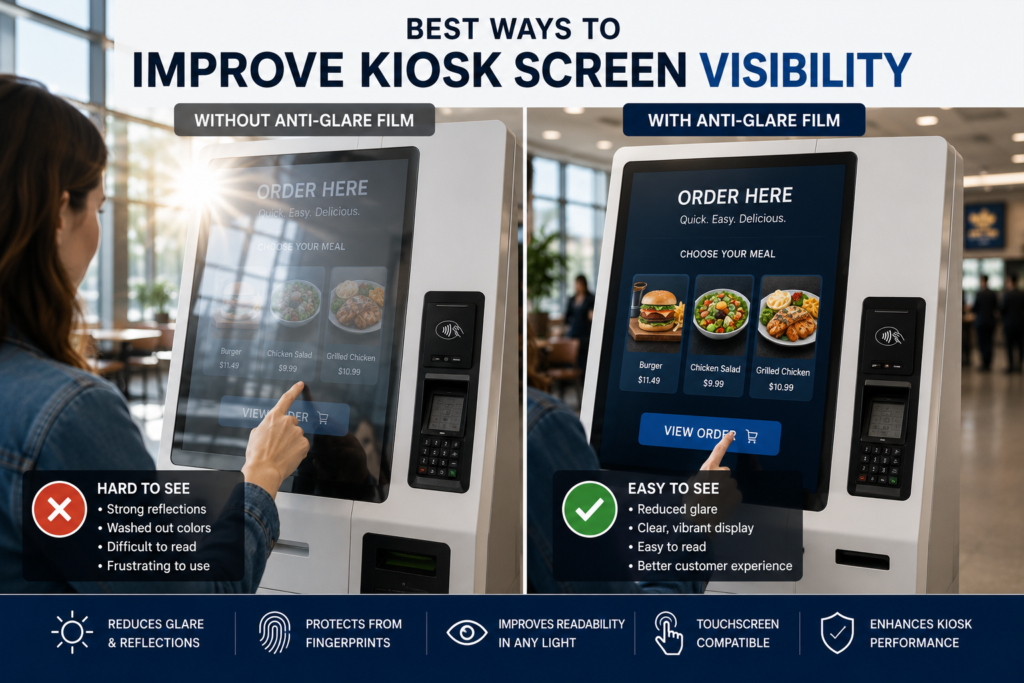
 Best Ways to Improve Kiosk Screen Visibility
Kiosks are supposed to make things easier.
They help customers order food, buy tickets, check in, find directions, pay bills, access services, browse products, scan memberships, and complete transactions without needing staff assistance.
However, a kiosk only works when people can see the screen clearly.
If the display is covered in glare, reflections, fingerprints, scratches, or poor contrast, the user experience falls apart quickly. Customers may tap the wrong button, abandon the process, ask for help, or avoid the kiosk completely.
That creates the exact problem the kiosk was meant to solve.
The good news is that many kiosk visibility problems can be improved without replacing the entire kiosk. In many cases, the issue is not the software or even the display itself. The issue is the screen-facing surface: glass, acrylic, touchscreen glass, protective cover, or kiosk face panel.
This guide breaks down the best ways to improve kiosk screen visibility using anti-glare film, better placement, proper brightness, surface maintenance, touchscreen planning, and installation prep.
Why Kiosk Screen Visibility Matters
A kiosk screen is not just a display. It is the interface between the customer and the service.
When visibility is poor, the entire interaction becomes harder.
Poor kiosk visibility can cause:
- Slower customer transactions
- More incorrect taps
- More abandoned sessions
- Lower self-service adoption
- More staff assistance requests
- Less customer confidence
- Poorer accessibility
- Lower upsell visibility
- Lower advertising performance
- A weaker brand experience
For public-facing kiosks, visibility is not a cosmetic detail. It affects performance.
If customers cannot read the screen, the kiosk becomes expensive furniture with a glowing rectangle attached. Fancy, but not useful.
Common Causes of Poor Kiosk Screen Visibility
Kiosk visibility issues usually come from several sources at once.
Common causes include:
- Direct sunlight
- Overhead lighting
- Storefront windows
- Reflections from polished floors
- Glossy screen surfaces
- Protective glass
- Acrylic face panels
- Fingerprints and smudges
- Scratches
- Low display brightness
- Poor viewing angle
- Bad placement
- Outdoor exposure
- Touchscreen glare
- Poor contrast in the interface design
Before choosing a fix, it helps to identify the real issue.
Is the screen too dim?
Is the surface reflecting light?
Additionally, is the protective acrylic scratched?
Is the kiosk facing a window?
Is the user interface too low contrast?
Each issue has a different solution.
Start by Identifying Brightness vs. Reflection
The first step is to determine whether the screen is too dim or the surface is too reflective.
Those are different problems.
If the screen is too dim, you may need a brighter display, better display settings, or replacement hardware.
However, if the screen is bright enough but reflections are blocking the interface, the problem is surface glare. In that case, Anti-Glare Film may be a smarter first step.
| Visibility Problem | Likely Cause | Possible Solution |
|---|---|---|
| Screen looks dark all day | Low brightness | Brighter display or settings adjustment |
| Screen reflects windows or lights | Surface glare | Anti-glare film |
| Touch buttons are hard to see | Glare on touchscreen | Touchscreen-compatible anti-glare film |
| Screen looks hazy | Dirty or scratched surface | Cleaning, surface review, or replacement |
| Visibility changes by time of day | Sun angle | Repositioning, shade, anti-glare film |
| Users tap wrong buttons | Interface glare or poor contrast | Anti-glare film and UI improvements |
Do not guess. Diagnose the screen in the actual environment where people use it.
Use Anti-Glare Film for Kiosk Screens
One of the most practical ways to improve kiosk screen visibility is to apply Anti-Glare Film for Kiosks.
Anti-glare film helps reduce reflections on the screen-facing surface. That surface may be display glass, protective glass, acrylic, touchscreen glass, or a larger kiosk face panel.
Anti-glare film can help with reflections from:
- Sunlight
- Windows
- Ceiling lights
- Storefront glass
- Vehicles
- Polished floors
- Bright walls
- Outdoor pavement
- Nearby displays
- Public space lighting
The film does not make the screen brighter. Instead, it reduces surface reflections so the existing screen can be easier to read.
That makes it useful for kiosks in malls, airports, restaurants, museums, hotels, banks, hospitals, schools, transportation hubs, and outdoor spaces.
Choose the Right Anti-Glare Film
Not every kiosk needs the same film.
Some kiosks need practical glare reduction. Others need glare control while maintaining a premium visual finish.
Standard Anti-Glare Film
Standard Anti-Glare Film is usually best when glare reduction and usability are the main priorities.
It is a strong fit for:
- Ordering kiosks
- Payment kiosks
- Parking kiosks
- Ticketing kiosks
- Outdoor kiosks
- Gas station kiosks
- Healthcare check-in kiosks
- Public service kiosks
- Utility screens
- Self-service terminals
Standard film is the workhorse for practical kiosk visibility.
Ultra Clear Anti-Glare Film
Ultra Clear Anti-Glare Film is better when clarity, visual polish, and customer experience matter more.
It is a strong fit for:
- Retail product selectors
- Museum interactives
- Luxury showroom kiosks
- Corporate lobby kiosks
- Hotel check-in screens
- Premium wayfinding kiosks
- Brand experience displays
- High-end touchscreen applications
If the kiosk displays rich visuals, product photography, videos, or branded content, Ultra Clear may be the better option.
Improve Touchscreen Visibility
Most kiosks are touch-enabled, which makes visibility even more important.
A touchscreen needs to be readable before the user can interact with it. If glare blocks buttons, menus, maps, payment prompts, or confirmation screens, users slow down fast.
Anti-Glare Film for Touchscreens can help improve visibility, but touchscreen projects need careful review.
Before requesting a quote, confirm:
- Is the kiosk touch-enabled?
- Is the surface glass or acrylic?
- Will users touch the film directly?
- Is the kiosk indoors or outdoors?
- Is the touchscreen capacitive or resistive?
- Is the screen behind protective glass?
- Are there sensors, cameras, or buttons nearby?
- Is image clarity or glare reduction more important?
If you do not know the touchscreen type, send photos and the kiosk model if available.
Touchscreen visibility is not just about reducing glare. It is about keeping the interface readable and usable.
Reduce Glare on Acrylic Kiosk Panels
Many kiosks use acrylic face panels or protective covers.
Acrylic is lightweight, durable, and easy to fabricate. However, it can reflect strongly under bright light. It can also scratch more easily than glass and attract dust from static.
If your kiosk uses acrylic, review Anti-Glare Film for Acrylic Panels.
Acrylic kiosk panels are common on:
- Self-service kiosks
- Outdoor kiosks
- Restaurant ordering systems
- Museum interactives
- Healthcare check-in stations
- Retail product selectors
- Ticketing machines
- Parking payment terminals
- Custom kiosk enclosures
Anti-glare film can help reduce reflections on acrylic surfaces while adding a protective surface layer.
However, acrylic needs careful cleaning and handling before installation.
Improve Kiosk Placement
Placement can make or break kiosk visibility.
Even the best screen can struggle if it faces a bright window, direct sun, reflective wall, polished floor, or glass storefront.
Before moving forward with a kiosk installation, evaluate:
- Where the sun hits during the day
- Whether overhead lights reflect on the screen
- Whether customers stand with bright light behind them
- Whether nearby glass creates reflections
- Whether the kiosk faces a window
- Whether the display is angled correctly
- Whether the viewing height is comfortable
- Whether the screen is shaded or exposed
Better placement can reduce glare before any product is added.
Better Kiosk Placement Tips
- Avoid facing large windows
- Avoid direct afternoon sun
- Angle the kiosk away from bright reflections
- Use shade or overhangs outdoors
- Avoid polished floors directly in front of the screen
- Test visibility from the actual user position
- Check the screen at different times of day
- Consider ADA and accessibility viewing angles
A kiosk should be tested where customers actually stand. Not where it looks good in a floorplan. Floorplans are sneaky little liars.
Add Shade or a Hood for Outdoor Kiosks
Outdoor kiosks face harsher glare conditions than indoor kiosks.
Sunlight, pavement, vehicles, buildings, and weather covers can all create reflections.
For Outdoor Displays, shade can help reduce direct sun exposure.
Useful shading strategies include:
- Canopies
- Awnings
- Recessed display placement
- Display hoods
- Kiosk roof structures
- Architectural overhangs
- Angled screen mounting
- Landscape shade
- Protective shrouds
However, shade does not eliminate all glare. A shaded screen can still reflect bright pavement, vehicles, or sky.
That is why shade and anti-glare film often work well together.
Adjust Display Brightness and Contrast
Display settings matter.
A kiosk screen that is too dim will be hard to read even with anti-glare film. Therefore, brightness and contrast should be reviewed before assuming the surface is the only issue.
Check:
- Brightness level
- Auto-brightness settings
- Contrast settings
- Screen timeout behavior
- Content contrast
- Text size
- Button size
- Background colors
- Day/night mode settings
- Outdoor brightness mode if available
For outdoor or bright indoor environments, display brightness may need to be higher.
However, brightness alone will not solve surface reflection. A bright screen with a reflective cover can still look bad.
The best visibility comes from both screen performance and surface control.
Improve the User Interface Design
Sometimes kiosk visibility problems are not only caused by glare.
The interface itself may be hard to read.
Common UI problems include:
- Low contrast text
- Small fonts
- Thin icons
- Busy backgrounds
- Light gray buttons
- Poor spacing
- Too much content
- Weak call-to-action buttons
- Important prompts near glare-heavy areas
- Text over images
- No high-contrast mode
To improve kiosk readability, use:
- Large text
- High contrast colors
- Clear buttons
- Simple navigation
- Bold icons
- Dark text on light backgrounds or light text on dark backgrounds
- Minimal clutter
- Clear confirmation prompts
- Strong visual hierarchy
Anti-glare film helps the surface. Good interface design helps the content.
Together, they make the kiosk far easier to use.
Keep the Screen Surface Clean
Fingerprints can destroy kiosk visibility.
Public touchscreens get touched all day. That means oils, smudges, dirt, dust, and cleaning residue can build up quickly.
Even a small amount of surface grime can catch light and make reflections worse.
Regular cleaning helps improve:
- Screen clarity
- Touchscreen usability
- Image sharpness
- Customer confidence
- Professional appearance
- Long-term surface condition
Cleaning should match the surface type.
Glass may tolerate more cleaning methods than acrylic. Acrylic needs gentler handling to avoid scratches or haze.
Before installing film, the surface should be clean, smooth, dry, and free of dust, oils, fingerprints, and old adhesive.
For more detail, see the Anti-Glare Film Installation Guide.
Replace Damaged Covers When Needed
Anti-glare film can help reduce reflections, but it cannot fix every surface problem.
If the kiosk cover is deeply scratched, cracked, yellowed, warped, or damaged, replacement may be needed before applying film.
Film may not hide:
- Deep scratches
- Cracks
- Surface gouges
- Yellowed acrylic
- Delamination
- Warped panels
- Impact damage
- Severe haze
If the surface is damaged, send photos before requesting a quote.
Sometimes anti-glare film is the right solution. Sometimes the panel needs to be replaced first.
Painful truth, but cheaper than pretending.
Improve Visibility for Indoor Kiosks
Indoor kiosks can still have major glare problems.
Common indoor kiosk locations include:
- Retail stores
- Shopping malls
- Hospitals
- Hotels
- Restaurants
- Corporate lobbies
- Museums
- Airports
- Universities
- Government offices
- Banks
- Entertainment venues
Indoor glare often comes from windows, overhead lighting, glass walls, polished floors, and nearby displays.
Anti-glare film can help reduce these reflections, especially when the kiosk sits near bright architectural features.
For premium indoor kiosks, Ultra Clear Anti-Glare Film may be preferred because clarity and appearance matter.
Improve Visibility for Outdoor Kiosks
Outdoor kiosks need stronger visibility planning.
They may be used for:
- Parking payment
- Ticketing
- Transit information
- Public maps
- Ordering
- EV charging
- Wayfinding
- Campus information
- Government services
- Event check-in
- Outdoor retail pickup
Outdoor visibility issues are usually caused by a combination of brightness, glare, surface material, and placement.
For outdoor projects, consider:
- Display brightness
- Anti-glare film
- Shade or overhangs
- Surface material
- Touchscreen compatibility
- Weather exposure
- Cleaning plan
- Worst-case sun angle
- Public use durability
Outdoor kiosks need to be designed for the real world, not the showroom.
The showroom has feelings. The sun does not.
Improve Visibility for Restaurant Ordering Kiosks
Restaurant kiosks need to be fast and easy.
Customers should be able to read menu items, prices, images, modifiers, upsells, and payment prompts without friction.
For restaurant environments, glare may come from:
- Storefront windows
- Overhead lights
- Menu board lighting
- Polished counters
- Bright floors
- Outdoor ordering areas
- Drive-thru sunlight
If the kiosk is part of a restaurant or drive-thru system, Anti-Glare Film for Menu Boards may also be relevant.
For food photography and premium menu visuals, Ultra Clear may be the better option.
For utility ordering screens, Standard film is usually practical.
Improve Visibility for Retail Kiosks
Retail kiosks often support brand experience.
They may show product catalogs, loyalty signups, interactive lookbooks, digital coupons, endless aisle tools, or product configurators.
For these applications, image clarity matters.
If the kiosk is used in a retail storefront or premium showroom, review Anti-Glare Film for Retail Storefront Displays and consider Ultra Clear Anti-Glare Film.
Retail kiosks need to look polished because the display is part of the brand.
If the screen looks washed out, the product feels cheaper. That is not the vibe.
Improve Visibility for Museum Kiosks
Museums and exhibits often use kiosks for visitor engagement, maps, storytelling, education, registration, and interactive media.
Lighting can be tricky because museums often use spotlights, glass cases, controlled room lighting, and reflective surfaces.
For these environments, Anti-Glare Film for Museums & Exhibits may be the best starting point.
Ultra Clear Anti-Glare Film is often preferred when:
- Exhibit visuals matter
- Visitors view screens up close
- Touchscreens show detailed content
- The kiosk is part of a premium installation
- The display supports storytelling or artifacts
For general wayfinding or visitor information kiosks, Standard film may still be appropriate.
Anti-Glare Film vs. Replacing the Kiosk Screen
If a kiosk screen is hard to see, replacement may seem like the obvious fix.
However, replacement may not solve glare if the surface remains reflective.
| Problem | Replace Screen | Add Anti-Glare Film |
| Display is dead | Replacement needed | Film will not fix dead display |
| Screen is too dim | May help | Does not increase brightness |
| Surface reflects light | May not solve it | Helps reduce reflections |
| Protective acrylic reflects | Replacement may be involved | Film may reduce glare |
| Touchscreen still works | Expensive upgrade | Easier retrofit |
| Multi-location rollout | Higher cost | More practical |
| Surface has light wear | New screen still exposed | Adds protective layer |
If the screen is failing, replace it.
If the screen works but the surface reflects light, film may be the better first step.
How to Measure Kiosk Screens for Anti-Glare Film
To quote kiosk anti-glare film, measure the exact surface where the film will be applied.
That could be:
- Touchscreen glass
- Protective glass
- Acrylic face panel
- Display window
- Full clear panel
- Custom screen cover
Use the How to Measure a Screen for Anti-Glare Film guide for detailed measuring instructions.
We typically need:
- Width
- Height
- Quantity
- Surface type
- Touchscreen or non-touchscreen
- Glass or acrylic
- Indoor or outdoor use
- Standard or Ultra Clear preference
- Photos of the kiosk
- Photos showing glare
- Shipping location
- Desired timeline
For multiple kiosks, list each size and quantity separately.
What Photos Should You Send?
Photos help confirm the surface, frame, glare source, and installation conditions.
Send:
- Straight-on photo of the kiosk screen
- Close-up of the surface
- Photo showing the glare issue
- Side-angle photo
- Full kiosk photo
- Photo of the frame or bezel
- Photo showing buttons, sensors, or cameras
- Photo with a tape measure if possible
- Photo during worst glare conditions
For outdoor kiosks, take photos at the time of day when visibility is worst.
For touchscreens, send a photo showing the interface if possible.
Common Mistakes to Avoid
Assuming the Display Is the Problem
The screen may work fine. The surface may be reflecting light.
Forgetting the Acrylic Face Panel
Many kiosks have acrylic covers that create glare.
Not Confirming Touchscreen Status
Touchscreens need review before film selection.
Measuring the Wrong Area
Measure the surface where film will actually sit.
Ignoring Lighting Conditions
A kiosk may look fine at night and terrible at noon.
Skipping Photos
Photos help avoid wrong assumptions.
Choosing the Wrong Film
Standard is best for practical utility screens. Ultra Clear is best for premium visual applications.
Not Cleaning the Surface
Dirty screens make glare worse and hurt installation quality.
Future Trends: Kiosks Are Becoming More Important
Kiosks are becoming a core part of modern customer experience.
You now see them in:
- Restaurants
- Retail stores
- Airports
- Hotels
- Hospitals
- Stadiums
- Museums
- Parking systems
- EV charging stations
- Campuses
- Government facilities
- Banks
- Entertainment venues
As kiosks become more common, screen visibility will become more important.
Future kiosk projects will need to plan for:
- Glare reduction
- Touchscreen compatibility
- Acrylic vs. glass surfaces
- Outdoor readability
- Custom film sizing
- Surface protection
- Premium UI clarity
- Multi-location consistency
- Cleaning and maintenance
The best kiosk is not the one with the flashiest interface.
It is the one customers can actually use without fighting the screen.
Final Takeaway
To improve kiosk screen visibility, start by identifying the real problem.
If the display is too dim, brightness or hardware may need attention. However, if the screen works but reflections make it hard to read, anti-glare film may be the better first step.
Anti-glare film can help improve visibility on kiosk touchscreens, protective glass, acrylic face panels, outdoor kiosks, restaurant ordering screens, retail kiosks, museum interactives, and public-facing self-service displays.
For the best result, confirm the surface type, touchscreen status, lighting conditions, size, quantity, and film preference.
To get started, send your kiosk details through the Request an Anti-Glare Film Quote page.
FAQ
How do I improve kiosk screen visibility?
Start by checking brightness, glare, screen placement, surface condition, touchscreen details, and cleaning. Anti-glare film may help if reflections are the main issue.
Can anti-glare film be used on kiosk touchscreens?
Yes, depending on the touchscreen type and surface. Touchscreen kiosk applications should be reviewed before ordering.
Can anti-glare film be used on acrylic kiosk panels?
Yes. Anti-glare film can be used on many acrylic kiosk panels and protective covers.
Does anti-glare film make kiosk screens brighter?
No. Anti-glare film does not increase brightness. It reduces surface reflections so the screen can be easier to read.
Should I use Standard or Ultra Clear Anti-Glare Film for kiosks?
Use Standard for practical self-service screens. Use Ultra Clear for premium retail, museum, hospitality, or brand-facing kiosks.
What measurements are needed for kiosk film?
Send width, height, quantity, surface type, touchscreen status, indoor/outdoor use, and photos showing the screen and glare issue.
Should I replace my kiosk screen or add anti-glare film?
If the display is failing or too dim, replacement may be needed. If glare is the problem, anti-glare film may be the better first step.
What photos should I send for a kiosk quote?
Send straight-on, close-up, glare issue, side-angle, full kiosk, bezel, and tape measure photos if possible.
Sources
OSHA workstation guidance recommends arranging lighting to avoid reflected glare on display screens:
https://www.osha.gov/etools/computer-workstations/workstation-environment
OSHA monitor guidance notes that monitor angle can create glare from ceiling lighting and that a glare screen may be needed:
https://www.osha.gov/etools/computer-workstations/components/monitors
3M screen protection products reference glare and screen scratching prevention:
https://www.3m.com/3M/en_US/privacy-screen-protectors-us/
Screen Solutions International:
https://ssidisplays.com/