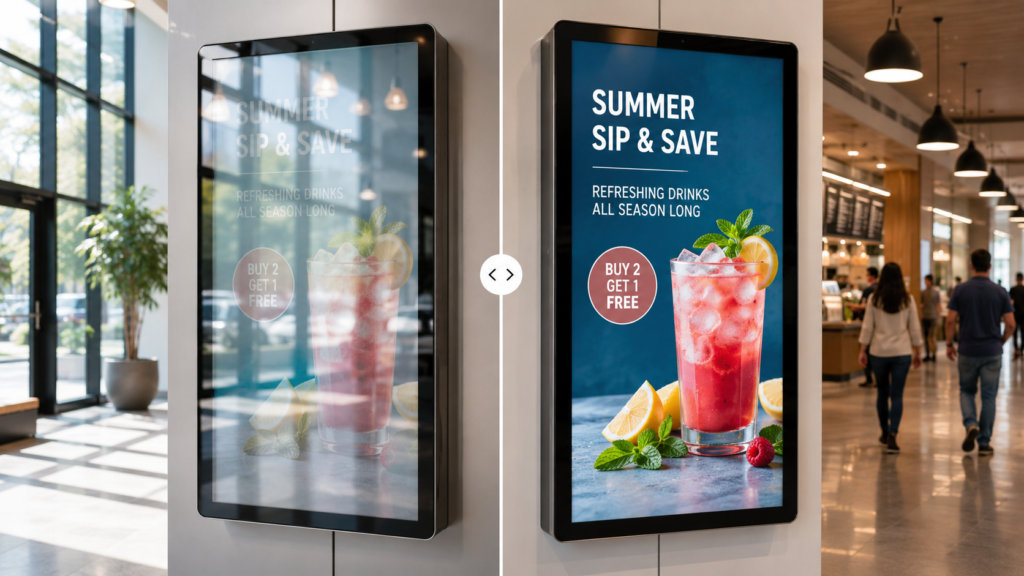
 How Glare Affects Customer-Facing Digital Signage
Customer-facing digital signage is supposed to grab attention, deliver information, and make the customer experience smoother.
It may show promotions, menus, product information, wayfinding, ticketing instructions, payment prompts, schedules, exhibit content, brand messaging, or public information.
However, there is one problem that can quietly destroy the value of a digital sign:
Glare.
When sunlight, overhead lighting, storefront glass, polished floors, glossy screens, or protective covers create reflections, the screen becomes harder to read. As a result, customers may ignore the display, miss the message, move closer, ask staff for help, or abandon the interaction entirely.
That matters because digital signage is not decoration. It is a business tool.
If people cannot see it, it is not working.
Fortunately, glare is often a surface problem, not a full display failure. In many cases, Anti-Glare Film can help reduce reflections on display glass, acrylic panels, touchscreens, kiosks, signage covers, and customer-facing screens.
This guide explains how glare affects customer-facing digital signage, where the problem shows up most often, and how anti-glare film can improve visibility without replacing the entire display.
What Is Customer-Facing Digital Signage?
Customer-facing digital signage includes any screen that customers, visitors, guests, travelers, patients, students, or users interact with or view in a public or commercial environment.
Common examples include:
- Retail displays
- Restaurant menu boards
- Outdoor digital signs
- Kiosks
- Gas pump screens
- ATM screens
- Touchscreens
- Transportation displays
- Museum exhibit screens
- Hotel lobby displays
- Corporate lobby signage
- Wayfinding displays
- Healthcare check-in screens
- Stadium concession screens
- Public information displays
These screens are used to communicate quickly.
That means visibility is everything.
A display may have high-quality content, great design, strong brightness, and expensive hardware. However, if glare blocks the message, the customer never gets the full value.
Why Glare Is Such a Big Problem for Digital Signage
Glare competes with the content on the screen.
Instead of seeing the menu, offer, map, payment prompt, or product image, the viewer sees reflected sunlight, ceiling lights, windows, vehicles, people, or surrounding architecture.
That can make digital signage look:
- Washed out
- Dim
- Blurry
- Hard to read
- Low contrast
- Distracting
- Unprofessional
- Difficult to use
- Less premium
- Less trustworthy
Glare does not need to completely block the screen to hurt performance. Even mild reflections can make viewers work harder to read the content.
And customers do not like working hard.
They move on.
Glare Reduces Readability
The most obvious problem is readability.
When glare hits a digital sign, text becomes harder to read. Small fonts, thin type, light colors, and detailed images suffer first.
This affects:
- Prices
- Menu items
- Product details
- Directions
- Instructions
- Schedules
- Warnings
- Promotions
- QR codes
- Payment prompts
- Button labels
- Fine print
For customer-facing signage, readability needs to happen fast. People are often walking, shopping, ordering, driving, navigating, or making decisions under time pressure.
If the content is not readable at a glance, the sign loses impact.
For screens used in restaurants, Anti-Glare Film for Menu Boards can help customers read items, prices, and specials more easily.
For public spaces, Anti-Glare Film for Digital Signage can help reduce reflections across a wide range of commercial screen applications.
Glare Lowers Customer Engagement
Digital signage exists to engage people.
It may invite them to scan a QR code, check a promotion, explore a product, use a kiosk, order food, join a loyalty program, watch a video, or follow directions.
Glare gets in the way of that engagement.
When a screen is hard to see, customers may:
- Ignore it
- Walk past it
- Avoid touching it
- Miss promotional content
- Skip loyalty offers
- Abandon self-service
- Ask staff for help
- Choose a faster option
- Assume the screen is broken
- View the display as low quality
This is especially damaging in retail, hospitality, restaurants, transportation, and entertainment venues where screens are meant to guide behavior.
If the screen cannot hold attention, it cannot influence action.
Glare Hurts Touchscreen Usability
Touchscreens are affected even more than regular displays.
A customer-facing touchscreen must be clear before the user can interact with it. If the user cannot see the button, menu, map, prompt, or checkout flow, the touchscreen becomes frustrating.
Glare can affect touchscreen usability on:
- Ordering kiosks
- Payment terminals
- Ticketing kiosks
- Hotel check-in screens
- Retail product selectors
- Wayfinding kiosks
- Gas pump touchscreens
- ATM touchscreens
- Museum interactives
- Parking payment screens
- Transportation kiosks
Anti-Glare Film for Touchscreens can help reduce reflections, but touchscreen applications should always be reviewed before ordering.
Important details include the touchscreen type, surface material, whether users touch the film directly, and whether the screen is indoors or outdoors.
Glare Can Make a Good Display Look Cheap
Digital signage is often part of a brand experience.
A clean, bright, easy-to-read display can make a space feel modern and professional. However, a reflective, washed-out, hard-to-read screen can make the installation feel unfinished.
This matters in:
- Luxury retail
- Corporate lobbies
- Hotels
- Museums
- Showrooms
- Restaurants
- Airports
- Healthcare facilities
- Entertainment venues
- High-end public spaces
For premium applications, Ultra Clear Anti-Glare Film may be the better option because it helps reduce glare while maintaining a cleaner visual appearance.
This is especially useful when the display shows photography, video, branding, product visuals, or exhibit content.
Glare Makes Outdoor Digital Signage Harder to Read
Outdoor digital signage faces the toughest visibility conditions.
Sunlight, pavement, windows, vehicles, weather covers, and bright surroundings can all reflect off the screen surface.
Common outdoor applications include:
- Outdoor retail signs
- Public information displays
- Parking screens
- Outdoor kiosks
- Drive-thru displays
- Gas pump screens
- EV charger displays
- Transit screens
- Stadium signage
- Campus wayfinding
- Outdoor menu boards
Anti-Glare Film for Outdoor Displays can help reduce surface reflections on outdoor display glass, acrylic covers, protective panels, and touchscreens.
However, outdoor visibility should also consider brightness, screen angle, shade, placement, and cleaning.
Brightness helps the screen output light.
Anti-glare film helps reduce reflected light.
You usually need both.
Glare Affects Retail Storefront Displays
Retail displays often sit near windows, glass walls, polished floors, and bright lighting.
That creates a perfect glare trap.
A storefront display may look great inside the store but become difficult to see from outside. Reflections from the street, sky, vehicles, and storefront glass can block the message.
Anti-Glare Film for Retail Storefront Displays can help improve visibility for:
- Window-facing screens
- Product promotion displays
- Digital posters
- Mall signage
- Luxury retail displays
- Interactive product selectors
- Sale announcement screens
- Brand experience displays
For premium retail, Ultra Clear Anti-Glare Film may be the best fit because brand presentation matters.
A luxury display should not look like a mirror that accidentally sells shoes.
Glare Affects Kiosks and Self-Service Screens
Kiosks are supposed to reduce friction.
They help users complete tasks without waiting for staff. However, glare can turn a self-service solution into a self-service problem.
Kiosk glare can affect:
- Ordering
- Ticketing
- Check-in
- Wayfinding
- Payment
- Loyalty signup
- Product selection
- Public service access
- Healthcare registration
- Hotel check-in
- Transportation transactions
Anti-Glare Film for Kiosks can help improve visibility on kiosk touchscreens, protective glass, acrylic face panels, and display windows.
For more detailed strategies, review Best Ways to Improve Kiosk Screen Visibility.
Glare Affects Gas Pump Screens and ATMs
Gas pump screens and ATMs are high-use transaction displays.
They need to be readable quickly and clearly because customers are entering payment information, selecting options, confirming transactions, or following instructions.
For gas pump screens, glare can affect:
- Payment prompts
- Fuel instructions
- Loyalty screens
- Receipt options
- Video ads
- Car wash offers
- Touchscreen buttons
For ATMs, glare can affect:
- PIN prompts
- Withdrawal options
- Deposit instructions
- Balance screens
- Receipt options
- Drive-up visibility
- Touchscreen buttons
Anti-Glare Film for Gas Pumps and Anti-Glare Film for ATMs are strong applications because these screens are often outdoors or exposed to bright lighting.
If a customer cannot read a transaction screen, the experience immediately feels worse.
That is bad for usability and even worse for trust.
Glare Affects Museums and Exhibit Displays
Museums and exhibits depend on clear viewing.
Visitors need to see artifacts, interpretive panels, videos, touchscreens, digital labels, and exhibit graphics without fighting reflections.
Glare can come from:
- Spotlights
- Glass cases
- Acrylic covers
- Gallery lighting
- Nearby displays
- Visitor movement
- Bright walls
- Protective panels
Anti-Glare Film for Museums & Exhibits can help reduce reflections on exhibit glass, acrylic panels, touchscreens, and protected display surfaces.
For museum applications, Ultra Clear Anti-Glare Film is often worth considering because image clarity and visitor experience matter.
The goal is not just to reduce glare. The goal is to preserve the exhibit experience.
Glare Affects Transportation Displays
Transportation displays are often used under pressure.
Travelers need to read schedules, gates, platforms, routes, maps, ticketing prompts, payment screens, and service alerts quickly.
Glare can create confusion in:
- Airports
- Train stations
- Bus terminals
- Transit centers
- Parking areas
- Ticketing zones
- Outdoor platforms
- Wayfinding areas
Anti-Glare Film for Transportation Displays can help improve visibility on public information screens, ticketing kiosks, wayfinding displays, and transit signage.
Clear screens help people move faster and ask fewer questions.
That is a win for everyone except the person who enjoys giving directions 400 times a day.
Glare Affects Control Rooms and Monitoring Displays
Customer-facing signage is the main focus here, but glare also affects staff-facing environments.
Control rooms, dispatch centers, monitoring rooms, and security spaces rely on clear screens for long periods of time.
Anti-Glare Film for Control Rooms can help reduce reflections on dashboards, monitoring displays, command center screens, and operator workstations.
This matters because glare can affect focus, visibility, and long-duration viewing comfort.
If your business uses both customer-facing and operator-facing displays, glare control should be considered across the whole environment.
Protective Glass and Acrylic Can Create Glare
Many digital signs have a protective layer over the display.
That layer may be glass or acrylic.
The screen itself may be bright and functional, but the protective cover may reflect light and reduce visibility.
This is common on:
- Kiosks
- Outdoor signs
- Gas pumps
- ATMs
- Museum exhibits
- Menu boards
- Transit screens
- Protective display cases
- Custom clear panels
Anti-Glare Film for Acrylic Panels can help reduce reflections on acrylic surfaces. For glass surfaces, Standard or Ultra Clear Anti-Glare Film may be recommended depending on the application.
For a deeper comparison, review Anti-Glare Film for Acrylic vs. Glass.
Anti-Glare Film vs. Replacing the Display
When digital signage is hard to read, replacing the display may seem like the obvious move.
Sometimes it is necessary.
However, if glare is the problem, a new display may still reflect the same light.
| Problem | Replace Display | Add Anti-Glare Film |
|---|---|---|
| Display is dead | Replacement needed | Film will not fix hardware |
| Screen is too dim | May help | Does not increase brightness |
| Surface reflects light | May not solve it | Helps reduce glare |
| Protective glass causes glare | Still possible | Helps reduce reflections |
| Touchscreen still works | Expensive upgrade | Easier retrofit |
| Multi-location rollout | Higher cost | More practical |
| Customer-facing display looks washed out | May help | Film may improve surface visibility |
Before replacing a screen, identify the real issue.
If the display is failing, replace it.
If the surface is reflecting light, film may be the better first step.
Standard or Ultra Clear Film for Digital Signage?
The best film depends on the display’s job.
Use Standard Anti-Glare Film When:
- Practical glare reduction is the main priority
- The screen shows text, prompts, menus, schedules, or instructions
- The display is outdoors or under harsh lighting
- The screen is used for transactions or self-service
- Cost-effective visibility improvement matters
- The application is utility-focused
Use Ultra Clear Anti-Glare Film When:
- Image clarity matters
- The display shows video, photography, branding, or product visuals
- The environment is premium or customer-experience focused
- The display is in retail, museums, hospitality, or corporate spaces
- A cleaner visual finish matters
- The screen is viewed up close
For a full comparison, see Standard vs. Ultra Clear Anti-Glare Film.
How to Improve Customer-Facing Display Visibility
Anti-glare film is one part of a larger visibility strategy.
To improve display visibility, consider:
- Anti-glare film
- Proper display brightness
- Better screen placement
- Reduced direct sunlight
- Display angle adjustment
- Shade or canopy structures
- High-contrast content design
- Larger fonts
- Cleaner user interface layouts
- Regular surface cleaning
- Reduced fingerprints and smudges
- Surface repair or replacement when needed
The best results come from combining screen performance, content design, and surface control.
What Measurements Are Needed?
To quote anti-glare film for digital signage, measure the exact surface where the film will be applied.
That may be:
- Display glass
- Protective glass
- Acrylic panel
- Touchscreen surface
- Kiosk face panel
- Menu board cover
- Outdoor display window
- Custom clear panel
Use the How to Measure a Screen for Anti-Glare Film guide for more detail.
We typically need:
- Width
- Height
- Quantity
- Surface type
- Touchscreen or non-touchscreen
- Glass or acrylic
- Indoor or outdoor use
- Standard or Ultra Clear preference
- Photos of the display
- Photos showing glare
- Shipping location
- Desired timeline
For multi-location signage projects, send a size and quantity schedule.
What Photos Should You Send?
Photos help confirm the glare issue and surface type.
Send:
- Straight-on photo of the display
- Close-up of the surface
- Photo showing glare
- Side-angle photo
- Full installation area photo
- Photo of the frame or bezel
- Photo with a tape measure if possible
- Photo during worst glare conditions
For storefronts, take photos from the customer’s viewing position.
For touchscreens, show the interface.
For outdoor screens, capture the worst sun angle.
For acrylic or glass panels, show the panel edge if possible.
Common Mistakes to Avoid
Assuming the Screen Is Too Dim
The display may be bright enough, but the surface may be reflecting light.
Replacing Displays Before Diagnosing Glare
A new display may still suffer from the same reflective surface problem.
Ignoring Protective Glass or Acrylic
The cover may be the glare source.
Using Low-Contrast Content
Even with glare reduction, weak design can still be hard to read.
Forgetting Touchscreen Details
Touchscreens need review before film selection.
Measuring the Wrong Area
Measure the film application surface, not necessarily the full housing.
Skipping Photos
Photos make recommendations and quotes much faster.
Future Trends: More Screens, More Visibility Problems
Customer-facing digital signage is expanding fast.
Businesses are adding displays to:
- Stores
- Restaurants
- Airports
- Hotels
- Museums
- Hospitals
- Stadiums
- Campuses
- Banks
- Gas stations
- EV chargers
- Transit hubs
- Public spaces
As more screens move into bright and uncontrolled environments, glare control will become more important.
Future display projects will need to plan for:
- Anti-glare film
- Touchscreen compatibility
- Acrylic and glass surface selection
- Outdoor readability
- Premium visual clarity
- Surface protection
- Multi-location consistency
- Better content contrast
- Easier maintenance
The winners will not be the businesses with the most screens.
They will be the ones with screens people can actually see.
Internal Links to Add
The following links are already included in the body above, but here is the internal link list for review:
- Anti-Glare Film
- Anti-Glare Film for Digital Signage
- Anti-Glare Film for Menu Boards
- Anti-Glare Film for Touchscreens
- Ultra Clear Anti-Glare Film
- Anti-Glare Film for Outdoor Displays
- Anti-Glare Film for Retail Storefront Displays
- Anti-Glare Film for Kiosks
- Best Ways to Improve Kiosk Screen Visibility
- Anti-Glare Film for Gas Pumps
- Anti-Glare Film for ATMs
- Anti-Glare Film for Museums & Exhibits
- Anti-Glare Film for Transportation Displays
- Anti-Glare Film for Control Rooms
- Anti-Glare Film for Acrylic Panels
- Anti-Glare Film for Acrylic vs. Glass
- Standard vs. Ultra Clear Anti-Glare Film
- How to Measure a Screen for Anti-Glare Film
- Request an Anti-Glare Film Quote
Final Takeaway
Glare can quietly reduce the value of customer-facing digital signage.
It makes screens harder to read, lowers engagement, hurts touchscreen usability, weakens brand presentation, and slows customer interactions.
In many cases, the display itself is not the main problem. The glass, acrylic, touchscreen surface, or protective cover is reflecting light.
Anti-glare film can help reduce those reflections and improve visibility on digital signage, kiosks, menu boards, touchscreens, gas pumps, ATMs, retail displays, museums, transportation screens, and other customer-facing applications.
To get started, measure the screen surface, take photos showing the glare issue, and submit your details through the Request an Anti-Glare Film Quote page.
FAQ
How does glare affect digital signage?
Glare makes digital signage harder to read by reflecting sunlight, lights, windows, people, vehicles, or surrounding surfaces on the screen.
Can glare reduce customer engagement?
Yes. If customers cannot clearly see the screen, they are more likely to ignore it, avoid using it, or ask staff for help.
Does anti-glare film make digital signage brighter?
No. Anti-glare film does not increase brightness. It reduces surface reflections so the existing display can be easier to see.
Can anti-glare film be used on customer-facing touchscreens?
Yes, depending on the touchscreen type and surface. Touchscreen applications should be reviewed before ordering.
Should I replace my display or use anti-glare film?
If the display is failing or too dim, replacement may be needed. If glare is the main issue, anti-glare film may be the better first step.
Is Standard or Ultra Clear Anti-Glare Film better for digital signage?
Standard is best for practical visibility and utility screens. Ultra Clear is better for premium displays where image clarity and brand presentation matter.
What information is needed for a quote?
Send width, height, quantity, surface type, touchscreen status, indoor/outdoor use, photos showing glare, and film preference.
Sources
OSHA workstation guidance recommends arranging lighting to avoid reflected glare on display screens:
https://www.osha.gov/etools/computer-workstations/workstation-environment
OSHA monitor guidance notes that monitor angle can create glare from ceiling lighting and that a glare screen may be needed:
https://www.osha.gov/etools/computer-workstations/components/monitors
3M screen protection products reference glare and screen scratching prevention:
https://www.3m.com/3M/en_US/privacy-screen-protectors-us/
Screen Solutions International:
https://ssidisplays.com/
Customer-facing digital signage is supposed to grab attention, deliver information, and make the customer experience smoother.
It may show promotions, menus, product information, wayfinding, ticketing instructions, payment prompts, schedules, exhibit content, brand messaging, or public information.
However, there is one problem that can quietly destroy the value of a digital sign:
Glare.
When sunlight, overhead lighting, storefront glass, polished floors, glossy screens, or protective covers create reflections, the screen becomes harder to read. As a result, customers may ignore the display, miss the message, move closer, ask staff for help, or abandon the interaction entirely.
That matters because digital signage is not decoration. It is a business tool.
If people cannot see it, it is not working.
Fortunately, glare is often a surface problem, not a full display failure. In many cases, Anti-Glare Film can help reduce reflections on display glass, acrylic panels, touchscreens, kiosks, signage covers, and customer-facing screens.
This guide explains how glare affects customer-facing digital signage, where the problem shows up most often, and how anti-glare film can improve visibility without replacing the entire display.
What Is Customer-Facing Digital Signage?
Customer-facing digital signage includes any screen that customers, visitors, guests, travelers, patients, students, or users interact with or view in a public or commercial environment.
Common examples include:
- Retail displays
- Restaurant menu boards
- Outdoor digital signs
- Kiosks
- Gas pump screens
- ATM screens
- Touchscreens
- Transportation displays
- Museum exhibit screens
- Hotel lobby displays
- Corporate lobby signage
- Wayfinding displays
- Healthcare check-in screens
- Stadium concession screens
- Public information displays
These screens are used to communicate quickly.
That means visibility is everything.
A display may have high-quality content, great design, strong brightness, and expensive hardware. However, if glare blocks the message, the customer never gets the full value.
Why Glare Is Such a Big Problem for Digital Signage
Glare competes with the content on the screen.
Instead of seeing the menu, offer, map, payment prompt, or product image, the viewer sees reflected sunlight, ceiling lights, windows, vehicles, people, or surrounding architecture.
That can make digital signage look:
- Washed out
- Dim
- Blurry
- Hard to read
- Low contrast
- Distracting
- Unprofessional
- Difficult to use
- Less premium
- Less trustworthy
Glare does not need to completely block the screen to hurt performance. Even mild reflections can make viewers work harder to read the content.
And customers do not like working hard.
They move on.
Glare Reduces Readability
The most obvious problem is readability.
When glare hits a digital sign, text becomes harder to read. Small fonts, thin type, light colors, and detailed images suffer first.
This affects:
- Prices
- Menu items
- Product details
- Directions
- Instructions
- Schedules
- Warnings
- Promotions
- QR codes
- Payment prompts
- Button labels
- Fine print
For customer-facing signage, readability needs to happen fast. People are often walking, shopping, ordering, driving, navigating, or making decisions under time pressure.
If the content is not readable at a glance, the sign loses impact.
For screens used in restaurants, Anti-Glare Film for Menu Boards can help customers read items, prices, and specials more easily.
For public spaces, Anti-Glare Film for Digital Signage can help reduce reflections across a wide range of commercial screen applications.
Glare Lowers Customer Engagement
Digital signage exists to engage people.
It may invite them to scan a QR code, check a promotion, explore a product, use a kiosk, order food, join a loyalty program, watch a video, or follow directions.
Glare gets in the way of that engagement.
When a screen is hard to see, customers may:
- Ignore it
- Walk past it
- Avoid touching it
- Miss promotional content
- Skip loyalty offers
- Abandon self-service
- Ask staff for help
- Choose a faster option
- Assume the screen is broken
- View the display as low quality
This is especially damaging in retail, hospitality, restaurants, transportation, and entertainment venues where screens are meant to guide behavior.
If the screen cannot hold attention, it cannot influence action.
Glare Hurts Touchscreen Usability
Touchscreens are affected even more than regular displays.
A customer-facing touchscreen must be clear before the user can interact with it. If the user cannot see the button, menu, map, prompt, or checkout flow, the touchscreen becomes frustrating.
Glare can affect touchscreen usability on:
- Ordering kiosks
- Payment terminals
- Ticketing kiosks
- Hotel check-in screens
- Retail product selectors
- Wayfinding kiosks
- Gas pump touchscreens
- ATM touchscreens
- Museum interactives
- Parking payment screens
- Transportation kiosks
Anti-Glare Film for Touchscreens can help reduce reflections, but touchscreen applications should always be reviewed before ordering.
Important details include the touchscreen type, surface material, whether users touch the film directly, and whether the screen is indoors or outdoors.
Glare Can Make a Good Display Look Cheap
Digital signage is often part of a brand experience.
A clean, bright, easy-to-read display can make a space feel modern and professional. However, a reflective, washed-out, hard-to-read screen can make the installation feel unfinished.
This matters in:
- Luxury retail
- Corporate lobbies
- Hotels
- Museums
- Showrooms
- Restaurants
- Airports
- Healthcare facilities
- Entertainment venues
- High-end public spaces
For premium applications, Ultra Clear Anti-Glare Film may be the better option because it helps reduce glare while maintaining a cleaner visual appearance.
This is especially useful when the display shows photography, video, branding, product visuals, or exhibit content.
Glare Makes Outdoor Digital Signage Harder to Read
Outdoor digital signage faces the toughest visibility conditions.
Sunlight, pavement, windows, vehicles, weather covers, and bright surroundings can all reflect off the screen surface.
Common outdoor applications include:
- Outdoor retail signs
- Public information displays
- Parking screens
- Outdoor kiosks
- Drive-thru displays
- Gas pump screens
- EV charger displays
- Transit screens
- Stadium signage
- Campus wayfinding
- Outdoor menu boards
Anti-Glare Film for Outdoor Displays can help reduce surface reflections on outdoor display glass, acrylic covers, protective panels, and touchscreens.
However, outdoor visibility should also consider brightness, screen angle, shade, placement, and cleaning.
Brightness helps the screen output light.
Anti-glare film helps reduce reflected light.
You usually need both.
Glare Affects Retail Storefront Displays
Retail displays often sit near windows, glass walls, polished floors, and bright lighting.
That creates a perfect glare trap.
A storefront display may look great inside the store but become difficult to see from outside. Reflections from the street, sky, vehicles, and storefront glass can block the message.
Anti-Glare Film for Retail Storefront Displays can help improve visibility for:
- Window-facing screens
- Product promotion displays
- Digital posters
- Mall signage
- Luxury retail displays
- Interactive product selectors
- Sale announcement screens
- Brand experience displays
For premium retail, Ultra Clear Anti-Glare Film may be the best fit because brand presentation matters.
A luxury display should not look like a mirror that accidentally sells shoes.
Glare Affects Kiosks and Self-Service Screens
Kiosks are supposed to reduce friction.
They help users complete tasks without waiting for staff. However, glare can turn a self-service solution into a self-service problem.
Kiosk glare can affect:
- Ordering
- Ticketing
- Check-in
- Wayfinding
- Payment
- Loyalty signup
- Product selection
- Public service access
- Healthcare registration
- Hotel check-in
- Transportation transactions
Anti-Glare Film for Kiosks can help improve visibility on kiosk touchscreens, protective glass, acrylic face panels, and display windows.
For more detailed strategies, review Best Ways to Improve Kiosk Screen Visibility.
Glare Affects Gas Pump Screens and ATMs
Gas pump screens and ATMs are high-use transaction displays.
They need to be readable quickly and clearly because customers are entering payment information, selecting options, confirming transactions, or following instructions.
For gas pump screens, glare can affect:
- Payment prompts
- Fuel instructions
- Loyalty screens
- Receipt options
- Video ads
- Car wash offers
- Touchscreen buttons
For ATMs, glare can affect:
- PIN prompts
- Withdrawal options
- Deposit instructions
- Balance screens
- Receipt options
- Drive-up visibility
- Touchscreen buttons
Anti-Glare Film for Gas Pumps and Anti-Glare Film for ATMs are strong applications because these screens are often outdoors or exposed to bright lighting.
If a customer cannot read a transaction screen, the experience immediately feels worse.
That is bad for usability and even worse for trust.
Glare Affects Museums and Exhibit Displays
Museums and exhibits depend on clear viewing.
Visitors need to see artifacts, interpretive panels, videos, touchscreens, digital labels, and exhibit graphics without fighting reflections.
Glare can come from:
- Spotlights
- Glass cases
- Acrylic covers
- Gallery lighting
- Nearby displays
- Visitor movement
- Bright walls
- Protective panels
Anti-Glare Film for Museums & Exhibits can help reduce reflections on exhibit glass, acrylic panels, touchscreens, and protected display surfaces.
For museum applications, Ultra Clear Anti-Glare Film is often worth considering because image clarity and visitor experience matter.
The goal is not just to reduce glare. The goal is to preserve the exhibit experience.
Glare Affects Transportation Displays
Transportation displays are often used under pressure.
Travelers need to read schedules, gates, platforms, routes, maps, ticketing prompts, payment screens, and service alerts quickly.
Glare can create confusion in:
- Airports
- Train stations
- Bus terminals
- Transit centers
- Parking areas
- Ticketing zones
- Outdoor platforms
- Wayfinding areas
Anti-Glare Film for Transportation Displays can help improve visibility on public information screens, ticketing kiosks, wayfinding displays, and transit signage.
Clear screens help people move faster and ask fewer questions.
That is a win for everyone except the person who enjoys giving directions 400 times a day.
Glare Affects Control Rooms and Monitoring Displays
Customer-facing signage is the main focus here, but glare also affects staff-facing environments.
Control rooms, dispatch centers, monitoring rooms, and security spaces rely on clear screens for long periods of time.
Anti-Glare Film for Control Rooms can help reduce reflections on dashboards, monitoring displays, command center screens, and operator workstations.
This matters because glare can affect focus, visibility, and long-duration viewing comfort.
If your business uses both customer-facing and operator-facing displays, glare control should be considered across the whole environment.
Protective Glass and Acrylic Can Create Glare
Many digital signs have a protective layer over the display.
That layer may be glass or acrylic.
The screen itself may be bright and functional, but the protective cover may reflect light and reduce visibility.
This is common on:
- Kiosks
- Outdoor signs
- Gas pumps
- ATMs
- Museum exhibits
- Menu boards
- Transit screens
- Protective display cases
- Custom clear panels
Anti-Glare Film for Acrylic Panels can help reduce reflections on acrylic surfaces. For glass surfaces, Standard or Ultra Clear Anti-Glare Film may be recommended depending on the application.
For a deeper comparison, review Anti-Glare Film for Acrylic vs. Glass.
Anti-Glare Film vs. Replacing the Display
When digital signage is hard to read, replacing the display may seem like the obvious move.
Sometimes it is necessary.
However, if glare is the problem, a new display may still reflect the same light.
| Problem | Replace Display | Add Anti-Glare Film |
|---|---|---|
| Display is dead | Replacement needed | Film will not fix hardware |
| Screen is too dim | May help | Does not increase brightness |
| Surface reflects light | May not solve it | Helps reduce glare |
| Protective glass causes glare | Still possible | Helps reduce reflections |
| Touchscreen still works | Expensive upgrade | Easier retrofit |
| Multi-location rollout | Higher cost | More practical |
| Customer-facing display looks washed out | May help | Film may improve surface visibility |
Before replacing a screen, identify the real issue.
If the display is failing, replace it.
If the surface is reflecting light, film may be the better first step.
Standard or Ultra Clear Film for Digital Signage?
The best film depends on the display’s job.
Use Standard Anti-Glare Film When:
- Practical glare reduction is the main priority
- The screen shows text, prompts, menus, schedules, or instructions
- The display is outdoors or under harsh lighting
- The screen is used for transactions or self-service
- Cost-effective visibility improvement matters
- The application is utility-focused
Use Ultra Clear Anti-Glare Film When:
- Image clarity matters
- The display shows video, photography, branding, or product visuals
- The environment is premium or customer-experience focused
- The display is in retail, museums, hospitality, or corporate spaces
- A cleaner visual finish matters
- The screen is viewed up close
For a full comparison, see Standard vs. Ultra Clear Anti-Glare Film.
How to Improve Customer-Facing Display Visibility
Anti-glare film is one part of a larger visibility strategy.
To improve display visibility, consider:
- Anti-glare film
- Proper display brightness
- Better screen placement
- Reduced direct sunlight
- Display angle adjustment
- Shade or canopy structures
- High-contrast content design
- Larger fonts
- Cleaner user interface layouts
- Regular surface cleaning
- Reduced fingerprints and smudges
- Surface repair or replacement when needed
The best results come from combining screen performance, content design, and surface control.
What Measurements Are Needed?
To quote anti-glare film for digital signage, measure the exact surface where the film will be applied.
That may be:
- Display glass
- Protective glass
- Acrylic panel
- Touchscreen surface
- Kiosk face panel
- Menu board cover
- Outdoor display window
- Custom clear panel
Use the How to Measure a Screen for Anti-Glare Film guide for more detail.
We typically need:
- Width
- Height
- Quantity
- Surface type
- Touchscreen or non-touchscreen
- Glass or acrylic
- Indoor or outdoor use
- Standard or Ultra Clear preference
- Photos of the display
- Photos showing glare
- Shipping location
- Desired timeline
For multi-location signage projects, send a size and quantity schedule.
What Photos Should You Send?
Photos help confirm the glare issue and surface type.
Send:
- Straight-on photo of the display
- Close-up of the surface
- Photo showing glare
- Side-angle photo
- Full installation area photo
- Photo of the frame or bezel
- Photo with a tape measure if possible
- Photo during worst glare conditions
For storefronts, take photos from the customer’s viewing position.
For touchscreens, show the interface.
For outdoor screens, capture the worst sun angle.
For acrylic or glass panels, show the panel edge if possible.
Common Mistakes to Avoid
Assuming the Screen Is Too Dim
The display may be bright enough, but the surface may be reflecting light.
Replacing Displays Before Diagnosing Glare
A new display may still suffer from the same reflective surface problem.
Ignoring Protective Glass or Acrylic
The cover may be the glare source.
Using Low-Contrast Content
Even with glare reduction, weak design can still be hard to read.
Forgetting Touchscreen Details
Touchscreens need review before film selection.
Measuring the Wrong Area
Measure the film application surface, not necessarily the full housing.
Skipping Photos
Photos make recommendations and quotes much faster.
Future Trends: More Screens, More Visibility Problems
Customer-facing digital signage is expanding fast.
Businesses are adding displays to:
- Stores
- Restaurants
- Airports
- Hotels
- Museums
- Hospitals
- Stadiums
- Campuses
- Banks
- Gas stations
- EV chargers
- Transit hubs
- Public spaces
As more screens move into bright and uncontrolled environments, glare control will become more important.
Future display projects will need to plan for:
- Anti-glare film
- Touchscreen compatibility
- Acrylic and glass surface selection
- Outdoor readability
- Premium visual clarity
- Surface protection
- Multi-location consistency
- Better content contrast
- Easier maintenance
The winners will not be the businesses with the most screens.
They will be the ones with screens people can actually see.
Final Takeaway
Glare can quietly reduce the value of customer-facing digital signage.
It makes screens harder to read, lowers engagement, hurts touchscreen usability, weakens brand presentation, and slows customer interactions.
In many cases, the display itself is not the main problem. The glass, acrylic, touchscreen surface, or protective cover is reflecting light.
Anti-glare film can help reduce those reflections and improve visibility on digital signage, kiosks, menu boards, touchscreens, gas pumps, ATMs, retail displays, museums, transportation screens, and other customer-facing applications.
To get started, measure the screen surface, take photos showing the glare issue, and submit your details through the Request an Anti-Glare Film Quote page.
FAQ
How does glare affect digital signage?
Glare makes digital signage harder to read by reflecting sunlight, lights, windows, people, vehicles, or surrounding surfaces on the screen.
Can glare reduce customer engagement?
Yes. If customers cannot clearly see the screen, they are more likely to ignore it, avoid using it, or ask staff for help.
Does anti-glare film make digital signage brighter?
No. Anti-glare film does not increase brightness. It reduces surface reflections so the existing display can be easier to see.
Can anti-glare film be used on customer-facing touchscreens?
Yes, depending on the touchscreen type and surface. Touchscreen applications should be reviewed before ordering.
Should I replace my display or use anti-glare film?
If the display is failing or too dim, replacement may be needed. If glare is the main issue, anti-glare film may be the better first step.
Is Standard or Ultra Clear Anti-Glare Film better for digital signage?
Standard is best for practical visibility and utility screens. Ultra Clear is better for premium displays where image clarity and brand presentation matter.
What information is needed for a quote?
Send width, height, quantity, surface type, touchscreen status, indoor/outdoor use, photos showing glare, and film preference.
Sources
OSHA workstation guidance recommends arranging lighting to avoid reflected glare on display screens:
https://www.osha.gov/etools/computer-workstations/workstation-environment
OSHA monitor guidance notes that monitor angle can create glare from ceiling lighting and that a glare screen may be needed:
https://www.osha.gov/etools/computer-workstations/components/monitors
3M screen protection products reference glare and screen scratching prevention:
https://www.3m.com/3M/en_US/privacy-screen-protectors-us/
Screen Solutions International:
https://ssidisplays.com/