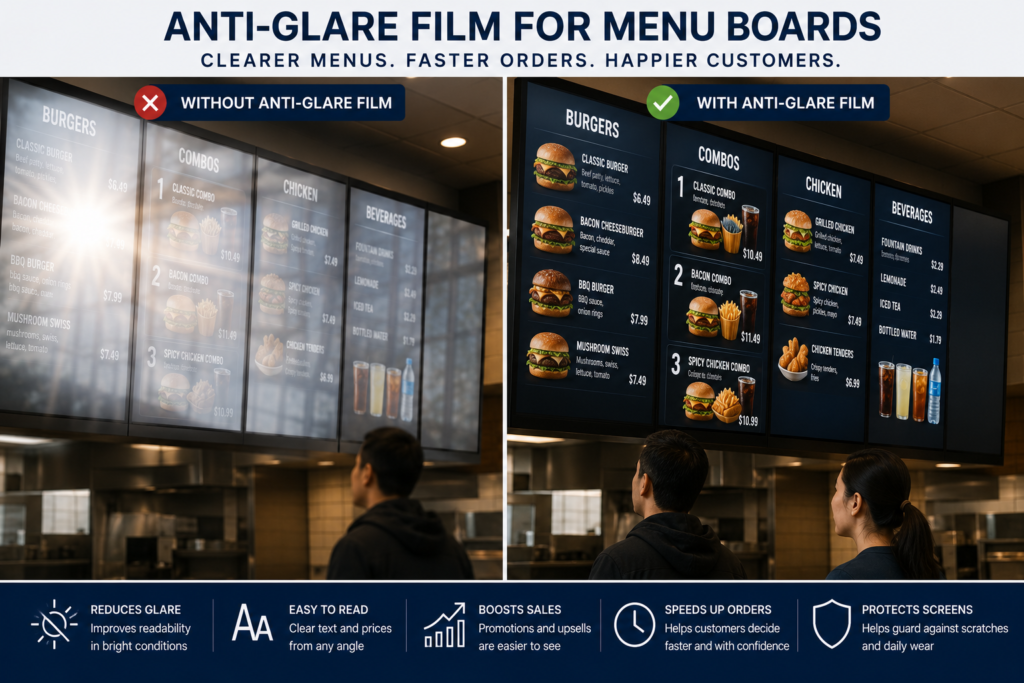
Anti-Glare Film for Menu Boards: What Restaurants Should Know
Digital menu boards are everywhere now.
Restaurants use them above counters, in drive-thru lanes, on ordering kiosks, in food courts, at concession stands, inside hotels, and across quick-service restaurant locations.
They make menus easier to update, improve promotion visibility, support seasonal offers, and help customers choose faster.
At least, that is the plan.
However, menu boards only work when customers can read them.
When glare from sunlight, windows, overhead lights, glossy display glass, acrylic covers, or restaurant lighting hits the screen, the menu becomes harder to see. Prices fade. Photos wash out. Specials disappear. Customers hesitate. Lines slow down.
That is where Anti-Glare Film for Menu Boards can help.
Anti-glare film helps reduce reflections on menu board glass, acrylic covers, protective panels, touchscreens, and display-facing surfaces. It does not make the screen brighter. Instead, it helps reduce the glare that prevents customers from seeing what is already on the display.
For restaurants, that can mean better readability, faster decisions, cleaner presentation, and a smoother ordering experience.
Why Menu Board Visibility Matters
A menu board is not just a display.
It is a sales tool.
It helps customers decide what to order, understand pricing, compare options, see promotions, and move through the line with confidence.
When the menu is hard to read, customers slow down.
Poor menu visibility can affect:
- Ordering speed
- Customer confidence
- Combo visibility
- Upsell performance
- Price readability
- Promotional visibility
- Drive-thru flow
- Staff workload
- Customer satisfaction
- Brand presentation
- Accessibility
- Perceived quality
In a restaurant environment, seconds matter.
A screen that is difficult to read does not just look bad. It can slow the entire operation.
Why Menu Boards Have Glare Problems
Menu boards often sit in difficult lighting environments.
Even indoor displays can have major glare problems because restaurants use windows, bright ceiling lights, pendant lights, glossy counters, polished floors, illuminated signs, and reflective surfaces.
Common glare sources include:
- Direct sunlight
- Storefront windows
- Drive-thru daylight
- Overhead lights
- Pendant lighting
- Kitchen lighting
- Food court lighting
- Glossy screen surfaces
- Protective glass
- Acrylic menu covers
- Bright counters
- Polished floors
- Customer viewing angles
- Outdoor pavement reflections
The result is a screen that may look clear from one angle and unreadable from another.
This is especially common when menu boards are mounted high, angled poorly, or placed near large windows.
Glare Makes Menus Harder to Read Fast
Customers do not study menu boards like a novel.
They scan.
They look for categories, prices, photos, combos, specials, add-ons, and order prompts. If they cannot read quickly, they hesitate.
Glare can make it harder to see:
- Menu items
- Prices
- Combo numbers
- Specials
- Promotional offers
- Food photos
- Nutritional information
- Modifier options
- Order instructions
- Pickup details
- Digital QR codes
- Allergen information
That creates friction exactly where restaurants need speed.
A readable menu helps customers make decisions. An unreadable menu turns ordering into a tiny hostage negotiation with the ceiling lights.
How Anti-Glare Film Helps Menu Boards
Anti-glare film helps reduce sharp reflections on display-facing surfaces.
Instead of allowing bright reflections to bounce directly back toward the viewer, the film helps soften those reflections so the menu content is easier to see.
Anti-glare film can be applied to many menu board surfaces, including:
- Display glass
- Protective glass
- Acrylic covers
- Touchscreen surfaces
- Digital menu board covers
- Drive-thru display covers
- Ordering kiosk screens
- Food court signage panels
- Concession display covers
- Custom clear panels
The main benefit is visibility.
The secondary benefit is surface protection from daily use, cleaning, fingerprints, and minor wear.
Anti-glare film is not a magic brightness booster. It will not fix a failing or dim display. However, if the screen is bright enough and the surface is reflecting light, film may be the smarter first step.
Anti-Glare Film for Indoor Restaurant Menu Boards
Indoor restaurant displays can still deal with intense reflections.
This is especially true in restaurants with:
- Large windows
- Bright dining rooms
- Open kitchens
- Pendant lights
- Polished floors
- Glass partitions
- Mall-facing storefronts
- Digital menu boards above counters
- Multiple screens next to each other
Anti-glare film can help improve visibility for:
- Counter menu boards
- Wall-mounted menu screens
- Digital specials boards
- Pickup order screens
- Beverage menus
- Dessert screens
- Promotional displays
- Customer-facing order status screens
For indoor displays that show mostly text, prices, and categories, Standard Anti-Glare Film is often practical.
For premium food photography or brand-heavy visuals, Ultra Clear Anti-Glare Film may be the better choice.
Anti-Glare Film for Drive-Thru Menu Boards
Drive-thru menu boards face some of the toughest visibility conditions in food service.
Customers view the screen from inside a vehicle, often through a windshield, while daylight, reflections, shade, sun angle, and screen angle all change throughout the day.
Drive-thru glare can come from:
- Direct sun
- Vehicle windshields
- Hood reflections
- Pavement
- Sky reflections
- Outdoor screen covers
- Protective glass
- Acrylic panels
- Nearby buildings
- Canopy structures
- Viewing angle from the car
Anti-Glare Film for Outdoor Displays can help reduce reflections on outdoor menu surfaces, while Anti-Glare Film for Menu Boards is the application-specific page to connect this use case.
Drive-thru screens need to be readable quickly because hesitation affects the line.
If the customer cannot see the menu, the line backs up. Then everyone gets to enjoy the slow-motion ballet of confusion. Beautiful? No. Expensive? Eventually.
Anti-Glare Film for Ordering Kiosks
Many restaurants now use self-service ordering kiosks.
These screens need clear visibility because customers must read menu categories, item photos, modifiers, upsells, payment prompts, and confirmation messages.
A touchscreen menu that is hard to read becomes frustrating fast.
Anti-Glare Film for Touchscreens can help reduce reflections on ordering kiosks, but touchscreen applications need review before ordering.
Before selecting film for an ordering kiosk, confirm:
- Is the screen touch-enabled?
- Is the surface glass or acrylic?
- Will customers touch the film directly?
- Is the kiosk indoors or outdoors?
- Is the screen near windows?
- Does the kiosk use protective glass or acrylic?
- Is image clarity or glare reduction more important?
For restaurant kiosks, visibility and touch performance both matter.
For more guidance, review Best Ways to Improve Kiosk Screen Visibility.
Anti-Glare Film for Food Courts and Concessions
Food courts and concession areas are bright, busy, and visually crowded.
Menu boards compete with:
- Other signs
- Overhead lighting
- Reflective floors
- Crowds
- Glass storefronts
- Bright counters
- Multiple neighboring displays
- Fast-moving customers
Anti-glare film can help improve readability for:
- Food court menu boards
- Stadium concession screens
- Theater concession menus
- Arena food displays
- Event venue menu screens
- Mall food hall displays
- Airport food court menus
- Convention center concession displays
In high-volume spaces, readability matters because customers need to make decisions quickly while standing in line.
A clearer screen can help reduce order friction.
Standard vs. Ultra Clear Film for Menu Boards
The best film depends on what the menu board needs to do.
Use Standard Anti-Glare Film When:
- Glare reduction is the main priority
- The display is mostly text and prices
- The screen is outdoors or harshly lit
- The menu is utility-focused
- Cost-effective visibility improvement matters
- The display is used in drive-thrus, concessions, or quick-service restaurants
Standard Anti-Glare Film is usually the practical choice when readability matters most.
Use Ultra Clear Anti-Glare Film When:
- Food photography matters
- Brand presentation matters
- The restaurant has a premium look
- The display shows rich media or video
- The screen is customer-experience focused
- The menu board is in a hotel, resort, upscale restaurant, or showroom-style space
Ultra Clear Anti-Glare Film is often better when the display needs glare reduction while preserving a cleaner, sharper appearance.
For a deeper comparison, review Standard vs. Ultra Clear Anti-Glare Film.
Anti-Glare Film for Acrylic Menu Covers
Some menu boards sit behind acrylic covers.
Acrylic is lightweight and easy to fabricate, which makes it useful for restaurants, kiosks, and protective display panels. However, acrylic can reflect strongly and scratch more easily than glass.
Anti-Glare Film for Acrylic Panels can help reduce reflections on acrylic menu covers while adding a protective surface layer.
Common acrylic menu applications include:
- Drive-thru display covers
- Counter menu covers
- Food court signage panels
- Concession menu shields
- Restaurant kiosk face panels
- Protective display windows
- Custom clear panels
Acrylic should be cleaned carefully before installation because dust, oils, scratches, and old adhesive can affect the final result.
For acrylic vs. glass planning, review Anti-Glare Film for Acrylic vs. Glass.
Anti-Glare Film vs. Replacing Menu Board Displays
If a menu board is hard to read, many restaurant owners assume the screen needs to be replaced.
Sometimes that is true.
However, if the display works and the main problem is reflection, replacing the screen may not solve the issue.
| Problem | Replace Display | Add Anti-Glare Film |
|---|---|---|
| Display is dead | Replacement needed | Film will not fix hardware |
| Screen is too dim | May help | Does not increase brightness |
| Surface reflects lights | May not solve it | Helps reduce glare |
| Protective glass reflects | Still possible | Helps reduce reflections |
| Acrylic cover causes glare | Replacement may be involved | Film may improve visibility |
| Multi-location rollout | Higher cost | More practical |
| Food photos look washed out | May help | Ultra Clear may help preserve appearance |
Before replacing displays, identify whether the real issue is brightness or surface reflection.
If the screen is failing, replace it.
If the surface is reflecting light, anti-glare film may be the better first step.
How Menu Board Glare Affects Restaurant Sales
Menu board glare affects more than readability.
It can also affect what customers buy.
If promotional content is difficult to see, customers may miss:
- Combo upgrades
- Limited-time offers
- Add-ons
- Desserts
- Drinks
- Car wash bundles
- Loyalty offers
- Meal deals
- Seasonal specials
- High-margin items
This is especially important for restaurants using menu boards to promote specials and upsells.
A screen that customers can clearly read has a better chance of influencing decisions.
A washed-out screen is just a very expensive wall decoration with power running to it.
How Menu Board Glare Affects Speed of Service
Restaurants care about speed.
When customers struggle to read a menu, they take longer to decide. That slows down the line, increases pressure on staff, and can create frustration for everyone waiting behind them.
Clear menu visibility can help support:
- Faster ordering
- Fewer repeated questions
- Less confusion
- Better drive-thru flow
- More confident decisions
- Smoother kiosk interactions
- Improved customer satisfaction
Anti-glare film will not fix a bad menu layout, slow POS system, or confusing pricing structure.
However, it can help remove one major obstacle: the customer not being able to see the menu.
Improve Menu Board Content Design Too
Anti-glare film helps the surface, but content design still matters.
To make menu boards easier to read, use:
- Large fonts
- High-contrast text
- Simple layouts
- Clear categories
- Strong item names
- Readable prices
- Large product images
- Minimal clutter
- Simple animations
- Consistent spacing
- Clear promotional hierarchy
- Dark backgrounds when appropriate
Avoid:
- Tiny text
- Thin fonts
- Low-contrast colors
- Text over busy photos
- Too many items per screen
- Flashing graphics
- Overloaded layouts
- Light gray text on bright backgrounds
The best menu boards combine good screen content with glare-controlled surfaces.
How to Measure Menu Boards for Anti-Glare Film
To quote anti-glare film for menu boards, measure the exact surface where the film will be applied.
That may be:
- Display glass
- Protective glass
- Acrylic cover
- Touchscreen surface
- Drive-thru display cover
- Menu board panel
- Ordering kiosk screen
Do not automatically measure the full display housing.
Use the How to Measure a Screen for Anti-Glare Film guide for step-by-step measuring help.
We typically need:
- Width
- Height
- Quantity
- Surface type
- Glass or acrylic
- Touchscreen or non-touchscreen
- Indoor, outdoor, or drive-thru use
- Standard or Ultra Clear preference
- Photos of the menu board
- Photos showing glare
- Shipping location
- Desired timeline
For multi-screen restaurant projects, list each size and quantity separately.
Multi-Location Restaurant Rollouts
Restaurant chains, franchises, food court operators, and hospitality groups may need anti-glare film across multiple screens or locations.
For larger projects, create a simple size schedule.
Example:
| Location | Application | Size | Quantity |
| Store 1 | Counter menu board | 48″ × 27″ | 4 |
| Store 1 | Ordering kiosk | 21″ × 14″ | 2 |
| Store 2 | Drive-thru screen | 32″ × 18″ | 2 |
| Store 3 | Menu board cover | 48″ × 27″ | 6 |
This helps keep the quote organized and prevents missed displays.
For many restaurant groups, anti-glare film can be a more practical visibility upgrade than replacing screens across every location.
What Photos Should You Send?
Photos help confirm the surface, lighting, glare issue, and installation conditions.
Send:
- Straight-on photo of the menu board
- Close-up of the surface
- Photo showing glare
- Side-angle photo
- Full restaurant or drive-thru area photo
- Photo of the frame or bezel
- Photo with tape measure if possible
- Photo during worst glare conditions
For drive-thru screens, capture the screen from the driver’s viewing position.
For indoor menu boards, take photos from where customers stand in line.
For kiosks, show the touchscreen interface and any surrounding hardware.
Installation Considerations for Menu Boards
Menu board surfaces are highly visible, so installation quality matters.
Before installation, the surface should be:
- Clean
- Smooth
- Dry
- Free of dust
- Free of oils
- Free of fingerprints
- Free of food residue
- Free of old adhesive
- Free of deep scratches
- Accurately measured
- Accessible for application
For drive-thru displays, outdoor screens, touchscreens, acrylic covers, or multi-location projects, professional installation may be recommended.
Review the Anti-Glare Film Installation Guide for prep and installation planning.
Common Mistakes to Avoid
Replacing Displays Before Diagnosing Glare
The screen may work fine. The surface may be reflecting light.
Measuring the Full Housing Instead of the Surface
Measure the exact area where the film will sit.
Forgetting Touchscreen Details
Ordering kiosks and interactive menu displays need review before film selection.
Ignoring Acrylic Covers
Acrylic may be the source of the glare.
Choosing the Wrong Film
Use Standard for practical readability. Use Ultra Clear when image quality and brand presentation matter more.
Using Low-Contrast Menu Design
Anti-glare film helps, but tiny low-contrast text is still a problem.
Not Capturing Worst-Case Glare
Take photos when the screen actually looks bad, not when it is magically behaving.
Future Trends: Menus Are Becoming More Digital
Restaurant menu boards are becoming more interactive, more dynamic, and more connected to sales strategy.
Expect more growth in:
- Digital drive-thru boards
- Self-service ordering kiosks
- AI-driven menu personalization
- Daypart menu automation
- Dynamic pricing displays
- Loyalty-integrated ordering screens
- Touchscreen menu systems
- Outdoor ordering displays
- Multi-location digital menu networks
- Premium food photography screens
As menu boards become more important, visibility will become more important too.
The future of restaurant menus is digital, but digital only works when people can read it.
Wild concept. Very powerful.
Final Takeaway
Anti-glare film for menu boards can help restaurants reduce reflections, improve readability, and make ordering easier for customers.
It is especially useful for digital menu boards, drive-thru displays, ordering kiosks, food court screens, concession menus, acrylic covers, and protective display glass.
If the screen is too dim or failing, replacement may be needed. However, if the display works and the real problem is glare on the surface, anti-glare film may be the smarter first step.
To get started, measure the menu board surface, take photos showing the glare issue, confirm whether the surface is glass, acrylic, or touchscreen, and submit the details through the Request an Anti-Glare Film Quote page.
FAQ
Can anti-glare film be used on digital menu boards?
Yes. Anti-glare film can be used on many digital menu board surfaces, including display glass, protective glass, acrylic covers, and some touchscreens.
Does anti-glare film make menu boards brighter?
No. Anti-glare film does not increase brightness. It reduces surface reflections so the screen can be easier to read.
Is anti-glare film good for drive-thru menu boards?
Yes. Drive-thru displays are a strong use case because sunlight, vehicle reflections, and viewing angles can make screens harder to read.
Can anti-glare film be used on ordering kiosks?
Yes, depending on the touchscreen type and surface. Ordering kiosk applications should be reviewed before ordering.
Should restaurants use Standard or Ultra Clear Anti-Glare Film?
Use Standard for practical menu readability. Use Ultra Clear when food photography, branding, and premium appearance matter more.
Can anti-glare film be used on acrylic menu covers?
Yes. Anti-glare film can be used on many acrylic menu covers and protective display panels.
Should I replace my menu board or use anti-glare film?
If the display is failing or too dim, replacement may be needed. If glare is the issue, anti-glare film may be the better first step.
What information is needed for a menu board quote?
Send width, height, quantity, surface type, touchscreen status, indoor/outdoor/drive-thru use, photos showing glare, and film preference.
Sources
OSHA workstation guidance recommends arranging lighting to avoid reflected glare on display screens:
https://www.osha.gov/etools/computer-workstations/workstation-environment
OSHA monitor guidance notes that monitor angle can create glare from ceiling lighting and that a glare screen may be needed:
https://www.osha.gov/etools/computer-workstations/components/monitors
3M screen protection products reference glare and screen scratching prevention:
https://www.3m.com/3M/en_US/privacy-screen-protectors-us/
Screen Solutions International:
https://ssidisplays.com/