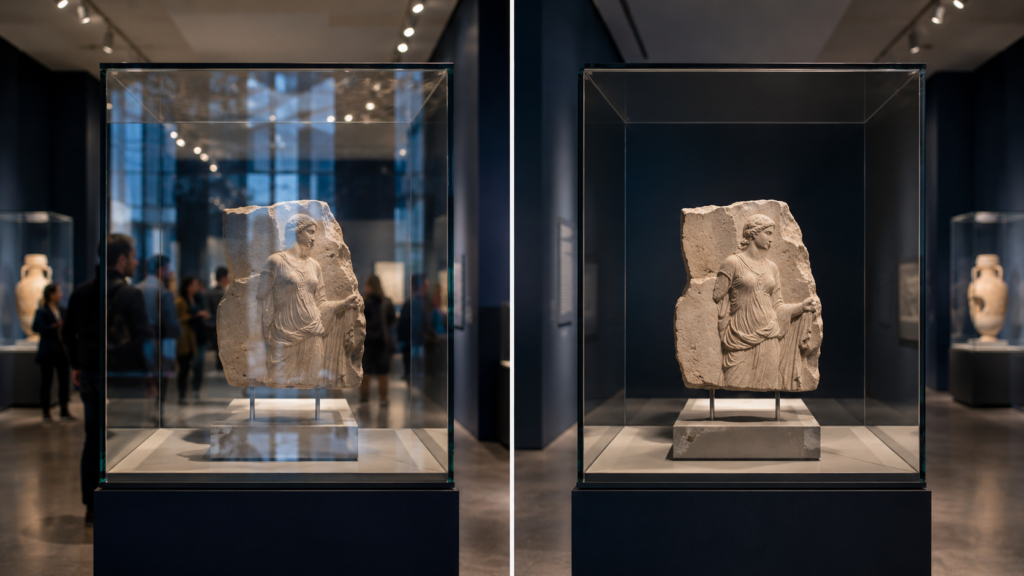
 How Museums Can Reduce Reflections on Exhibit Glass
Museums are built around attention.
Visitors come to see artifacts, artwork, historical objects, interactive exhibits, digital storytelling, rare collections, and carefully designed educational displays.
However, one thing can quickly break that experience:
Reflections.
When exhibit glass, acrylic panels, display cases, touchscreens, or protective covers reflect lights, windows, visitors, nearby screens, or gallery walls, the object behind the surface becomes harder to see.
Instead of focusing on the artifact, visitors see glare.
That is a problem because museums rely on clear visibility, clean presentation, and uninterrupted storytelling.
Fortunately, museums can reduce reflections on exhibit glass using a combination of lighting control, display placement, surface selection, anti-glare film, acrylic planning, touchscreen review, and proper maintenance.
For many existing exhibits, Anti-Glare Film for Museums & Exhibits can be a practical way to reduce glare without replacing the entire display case or panel.
Why Reflections Are a Problem in Museums
Museum exhibits often use glass and acrylic for good reasons.
They protect objects, control visitor access, reduce dust exposure, support security, and create clean presentation surfaces.
However, those same clear surfaces can reflect the surrounding environment.
Common reflection sources include:
- Track lighting
- Spotlights
- Gallery windows
- Bright walls
- Visitors walking by
- Other display cases
- Digital screens
- Overhead lighting
- Polished floors
- Acrylic covers
- Protective glass
- Exterior daylight
- Emergency lighting
- Exhibit graphics nearby
Even a beautifully designed exhibit can become difficult to view if the protective surface reflects too much light.
When that happens, visitors may move around, squint, take poor photos, miss details, or disengage from the content.
For museums, visibility is not just a technical issue. It is part of the visitor experience.
Reflections Interrupt the Story
Every exhibit tells a story.
That story may be about history, science, art, culture, nature, engineering, technology, local heritage, or personal memory.
When reflections block the object or display, the story gets interrupted.
Reflections can make it harder to see:
- Artifacts
- Labels
- Fine details
- Textures
- Small objects
- Archival documents
- Artwork
- Digital screens
- Interactive displays
- Timeline graphics
- Embedded media
- Touchscreen content
- Protective panels
- Exhibit lighting details
A visitor should not have to play “find the artifact behind my own reflection.”
That game has terrible replay value.
Start With Lighting Control
Lighting is one of the biggest causes of exhibit glass reflections.
Museum lighting needs to illuminate objects, create atmosphere, protect sensitive materials, and guide visitor attention. However, when lights hit glass or acrylic at the wrong angle, they create glare.
To reduce reflections, museums should review:
- Spotlight angles
- Track lighting positions
- Window light exposure
- Overhead light placement
- Light intensity
- Color temperature
- Reflections from nearby cases
- Reflections from digital screens
- Bright walls facing the glass
- Visitor viewing angles
Sometimes small changes in lighting angle can dramatically reduce reflections.
The goal is to light the object, not the glass.
Adjust Exhibit Angles and Viewing Paths
Display angle matters.
A flat glass case facing a bright light source or window will reflect more strongly than a properly angled surface.
Museums can reduce reflections by adjusting:
- Case angle
- Object placement
- Visitor viewing direction
- Lighting direction
- Wall color
- Distance from windows
- Screen angle
- Label placement
- Nearby reflective surfaces
Even a small angle change can shift reflections away from the visitor’s line of sight.
This is especially useful for:
- Glass display cases
- Acrylic exhibit covers
- Wall-mounted displays
- Interactive touchscreens
- Digital labels
- Protected artwork
- Tabletop cases
- Freestanding exhibit panels
When possible, test the exhibit from the visitor’s actual viewing position, not just from the installer’s ladder or the curator’s preferred inspection angle.
Use Anti-Glare Film on Existing Exhibit Surfaces
For existing exhibits, replacing glass or acrylic may be expensive, disruptive, or unnecessary.
If the surface is in good condition but reflects too much light, anti-glare film may be a practical solution.
Anti-glare film can help reduce reflections on:
- Exhibit glass
- Acrylic panels
- Display case windows
- Touchscreen surfaces
- Protective covers
- Digital labels
- Visitor center screens
- Interactive kiosks
- Timeline displays
- Signage panels
- Custom clear panels
Anti-glare film does not make an object brighter. Instead, it helps reduce reflections on the clear surface so visitors can see the object or screen more clearly.
That makes it useful for museums where visibility matters but full glass replacement is not ideal.
Standard vs. Ultra Clear Anti-Glare Film for Museums
Museums often need a careful balance between glare reduction and visual clarity.
That is why film selection matters.
Standard Anti-Glare Film
Standard Anti-Glare Film is best when practical glare reduction is the main priority.
It may be useful for:
- Visitor information screens
- Utility displays
- General wayfinding panels
- Basic touchscreen kiosks
- Public-facing digital signage
- Non-premium display covers
- Support signage
Ultra Clear Anti-Glare Film
Ultra Clear Anti-Glare Film is usually better when image clarity, artifact visibility, and presentation quality matter more.
It may be the better choice for:
- Artifact display cases
- Premium exhibit glass
- Acrylic panels viewed up close
- Digital storytelling screens
- Gallery displays
- Protected artwork
- High-end visitor interactives
- Museum retail displays
- Donor recognition screens
- Immersive exhibit displays
For many museum applications, Ultra Clear is the stronger starting point because visitors are often viewing detailed objects, graphics, or media up close.
For a full comparison, review Standard vs. Ultra Clear Anti-Glare Film.
Glass vs. Acrylic in Museum Exhibits
Museums use both glass and acrylic.
Each material has advantages.
Glass is often used for premium display cases, framed exhibits, durable panels, and applications where clarity and scratch resistance matter.
Acrylic is often used for lightweight panels, temporary exhibits, children’s museums, interactive displays, protective covers, and custom fabricated exhibit elements.
Both can create reflections.
Glass Exhibit Surfaces
Glass can offer excellent clarity and durability, but it can also reflect lights and visitors sharply.
Common glass applications include:
- Artifact cases
- Premium display windows
- Framed artwork covers
- Historical document cases
- Gallery displays
- Touchscreen glass
- Protective display glass
Acrylic Exhibit Surfaces
Acrylic is lighter and easier to fabricate, but it scratches more easily and may attract static dust.
Common acrylic applications include:
- Protective panels
- Custom exhibit covers
- Interactive displays
- Children’s museum panels
- Temporary exhibit shields
- Lightweight display cases
- Digital screen covers
Anti-Glare Film for Acrylic Panels can help reduce reflections on acrylic surfaces. However, acrylic needs careful cleaning and handling before installation.
For a deeper breakdown, review Anti-Glare Film for Acrylic vs. Glass.
Reducing Reflections on Museum Touchscreens
Museum touchscreens are powerful tools.
They can show maps, timelines, videos, oral histories, educational games, interactive archives, digital labels, donor content, and visitor surveys.
However, touchscreens can become hard to use when reflections block the interface.
Common museum touchscreen glare sources include:
- Gallery lights
- Nearby windows
- Visitor reflections
- Bright walls
- Other screens
- Protective glass
- Acrylic overlays
- Ceiling lights
Anti-Glare Film for Touchscreens can help reduce reflections, but touchscreen applications need review before ordering.
Before selecting film, confirm:
- Is the screen touch-enabled?
- Is the surface glass or acrylic?
- Will visitors touch the film directly?
- Is the screen indoors or outdoors?
- Is clarity or glare reduction more important?
- Is the display behind protective glass?
- Are there sensors, cameras, or buttons near the surface?
For high-end museum interactives, Ultra Clear Anti-Glare Film may be preferred because image clarity and user experience matter.
Reducing Reflections on Digital Exhibit Displays
Museums increasingly use digital displays as part of exhibit storytelling.
These may include:
- Video screens
- Digital labels
- Timeline displays
- Projection-adjacent screens
- Immersive media displays
- Donor recognition screens
- Interactive maps
- Educational displays
- Rotating content screens
- Visitor center signage
For these applications, Anti-Glare Film for Digital Signage can help reduce reflections on display-facing surfaces.
However, digital exhibit displays often require more visual polish than typical utility signage.
If the content includes artwork, photography, video, detailed graphics, or historical imagery, Ultra Clear Anti-Glare Film may be the better choice.
Reducing Reflections on Museum Kiosks
Museum kiosks often serve as information points, check-in stations, interactive exhibit controls, donation stations, or wayfinding systems.
Glare can make these kiosks harder to use.
Anti-Glare Film for Kiosks can help improve visibility on:
- Visitor information kiosks
- Ticketing kiosks
- Membership signup screens
- Donation kiosks
- Interactive exhibit stations
- Wayfinding kiosks
- Touchscreen learning stations
- Museum retail kiosks
If the kiosk uses a touchscreen, also review Anti-Glare Film for Touchscreens.
For general wayfinding, Standard Anti-Glare Film may be practical. For premium interactive experiences, Ultra Clear Anti-Glare Film may be the better option.
Reducing Reflections in Museum Retail and Gift Shops
Museum gift shops often use digital displays, glass cases, and acrylic panels.
These displays may promote:
- Featured products
- Books
- Gifts
- Memberships
- Donor programs
- Limited-edition items
- Event tickets
- Digital signage promotions
Because museum retail areas often use bright lighting and glass cases, reflections can be a problem.
Anti-Glare Film for Retail Storefront Displays may apply to museum retail displays, especially when product presentation and clarity matter.
For premium shop displays, Ultra Clear Anti-Glare Film may be the right choice.
Anti-Glare Film vs. Anti-Reflective Glass
Museums may also consider anti-reflective glass.
Anti-reflective glass can be an excellent option for premium new display cases or projects where specialty glass can be specified before fabrication.
However, it may not be practical for every existing exhibit.
Anti-glare film vs. anti-reflective glass comes down to project needs.
| Option | Best For | Considerations |
|---|---|---|
| Anti-glare film | Existing glass, acrylic, touchscreens, display covers | Retrofit-friendly and custom sizing available |
| Anti-reflective glass | New premium cases and specialty glass installations | May require glass replacement and higher cost |
| Standard anti-glare film | Utility displays and practical glare reduction | More functional focus |
| Ultra Clear anti-glare film | Premium exhibits and visual clarity | Better for high-end presentation |
For existing museum surfaces, anti-glare film may be the more practical first step.
For new premium artifact cases, anti-reflective glass may be worth reviewing.
Anti-Glare Film vs. Replacing Exhibit Glass
Replacing exhibit glass or acrylic can be expensive and disruptive.
It may involve fabrication, removal, downtime, object handling, security concerns, and reinstallation.
If the surface is damaged, replacement may be necessary. However, if the issue is reflection, anti-glare film may be a better first move.
| Problem | Replace Glass or Acrylic | Add Anti-Glare Film |
| Surface is cracked | Replacement needed | Film will not fix structural damage |
| Surface is deeply scratched | Replacement may be needed | Film may not hide deep scratches |
| Surface reflects lights | Replacement may not solve it | Helps reduce reflections |
| Existing case fits well | Replacement adds disruption | Easier retrofit |
| Acrylic cover creates glare | Refabrication may be costly | Film may improve visibility |
| Touchscreen still works | Replacement may be expensive | Film may improve usability |
| Premium exhibit needs clarity | Specialty glass may help | Ultra Clear film may be practical |
Before replacing an exhibit surface, identify whether the problem is damage or reflection.
If it is reflection, anti-glare film is worth reviewing.
Keep Exhibit Surfaces Clean
Dirty glass and acrylic can make reflections worse.
Dust, fingerprints, cleaning residue, smudges, and scratches scatter light and reduce clarity.
Museum surfaces should be cleaned carefully based on material type.
Glass Cleaning Considerations
Glass is more durable than acrylic but still needs proper cleaning. Avoid leaving residue that can catch light.
Acrylic Cleaning Considerations
Acrylic scratches more easily, so avoid abrasive cloths, harsh chemicals, and aggressive scraping.
Before applying film, surfaces should be:
- Clean
- Smooth
- Dry
- Free of dust
- Free of fingerprints
- Free of oils
- Free of old adhesive
- Free of deep scratches
- Accurately measured
For more prep details, review the Anti-Glare Film Installation Guide.
How to Measure Exhibit Glass for Anti-Glare Film
To quote anti-glare film for museum exhibits, measure the exact surface where the film will be applied.
That may be:
- Exhibit glass
- Acrylic panel
- Display case window
- Touchscreen surface
- Protective cover
- Digital label screen
- Custom clear panel
Use the How to Measure a Screen for Anti-Glare Film guide for step-by-step measuring help.
We typically need:
- Width
- Height
- Quantity
- Surface type
- Glass or acrylic
- Touchscreen or non-touchscreen
- Indoor or outdoor use
- Standard or Ultra Clear preference
- Photos of the exhibit surface
- Photos showing glare
- Shipping location
- Desired timeline
For multiple exhibit panels, list each size separately.
Example:
| Exhibit Surface | Material | Size | Quantity |
| Artifact case | Glass | 36″ × 24″ | 4 |
| Interactive touchscreen | Glass | 21″ × 14″ | 2 |
| Exhibit panel | Acrylic | 48″ × 30″ | 6 |
What Photos Should Museums Send?
Photos help confirm the surface, lighting, glare issue, and installation conditions.
Send:
- Straight-on photo of the exhibit surface
- Close-up of the glass or acrylic
- Photo showing the reflection problem
- Side-angle photo
- Full exhibit photo
- Photo of the lighting above or around the display
- Photo with tape measure if possible
- Edge photo if the panel is acrylic
- Photo showing touchscreen interface if applicable
For best results, take photos from the visitor’s viewing position.
That is the view that matters most.
Installation Considerations for Museums
Museum installations need extra care because the surrounding environment may include valuable objects, delicate surfaces, exhibit lighting, public traffic, and strict presentation standards.
Before installation, consider:
- Object protection
- Exhibit access
- Surface condition
- Dust control
- Lighting conditions
- Visitor schedule
- Case opening requirements
- Touchscreen use
- Acrylic handling
- Edge alignment
- Cleaning process
- Visual expectations
For premium exhibits, touchscreens, large glass panels, acrylic panels, or high-visibility visitor areas, professional installation may be recommended.
Installation quality matters because museum visitors often view surfaces up close.
Small flaws are easier to notice.
Museums are basically where tiny visual imperfections go to get judged by people wearing comfortable shoes.
Common Mistakes to Avoid
Only Adjusting Brightness
Brightness may help screens, but it will not fix reflections on exhibit glass.
Ignoring Light Angles
Spotlights and track lights can create strong glare if aimed poorly.
Using the Wrong Film Type
Standard film may be fine for utility displays. Ultra Clear may be better for premium exhibits.
Treating Acrylic Like Glass
Acrylic scratches more easily and needs gentler handling.
Forgetting Touchscreen Details
Museum touchscreens need review before film selection.
Measuring the Case Instead of the Surface
Measure the exact surface where film will be applied.
Not Sending Visitor-Angle Photos
The visitor’s viewpoint is the most important view.
Waiting Until After Installation to Address Glare
Glare should be reviewed during exhibit design whenever possible.
Future Trends: Museums Are Becoming More Interactive
Museums are using more digital and interactive technology than ever before.
Modern exhibits increasingly include:
- Touchscreens
- Transparent displays
- Digital labels
- Interactive timelines
- Projection-based experiences
- Immersive media
- Digital donor walls
- Visitor kiosks
- Augmented reality stations
- Interactive maps
- Custom acrylic panels
- Display case media screens
As exhibits become more screen-based and glass-heavy, reflection control will become more important.
Future museums will need to plan for:
- Anti-glare film
- Ultra Clear visual surfaces
- Touchscreen compatibility
- Acrylic vs. glass selection
- Lighting control
- Surface protection
- Digital signage readability
- Visitor photography
- Multi-panel exhibit consistency
The best museum technology should disappear into the story.
If visitors notice the reflection before the artifact, the surface is stealing the show.
Final Takeaway
Museums can reduce reflections on exhibit glass by controlling lighting, adjusting display angles, improving surface placement, choosing the right glass or acrylic, keeping surfaces clean, and using anti-glare film when appropriate.
For existing exhibits, anti-glare film can be a practical way to reduce reflections on glass, acrylic panels, touchscreens, digital displays, kiosks, and protective covers without replacing the entire display case or surface.
Standard Anti-Glare Film may work well for utility displays and basic signage. Ultra Clear Anti-Glare Film is often the better choice for premium exhibits, artifact cases, digital storytelling displays, and visitor-facing surfaces where clarity matters.
To get started, measure the exhibit surface, take photos from the visitor’s viewing angle, confirm whether the surface is glass or acrylic, and submit the details through the Request an Anti-Glare Film Quote page.
FAQ
How can museums reduce reflections on exhibit glass?
Museums can reduce reflections by adjusting lighting, changing display angles, managing visitor viewing paths, using anti-glare film, selecting the right glass or acrylic, and keeping surfaces clean.
Can anti-glare film be used on museum exhibit glass?
Yes. Anti-glare film can be used on many exhibit glass surfaces, depending on the application, surface condition, and visual requirements.
Can anti-glare film be used on acrylic museum panels?
Yes. Anti-glare film can be used on many acrylic panels, but acrylic requires careful cleaning and handling.
Should museums use Standard or Ultra Clear Anti-Glare Film?
Use Standard for utility displays and practical glare reduction. Use Ultra Clear for premium exhibits, artifact cases, digital storytelling displays, and surfaces where clarity matters.
Can anti-glare film be used on museum touchscreens?
Yes, depending on the touchscreen type and surface. Touchscreen applications should be reviewed before ordering.
Is anti-glare film better than anti-reflective glass?
It depends on the project. Anti-reflective glass can be excellent for new premium cases, while anti-glare film is often more practical for existing surfaces.
Does anti-glare film make exhibits brighter?
No. Anti-glare film does not increase brightness. It reduces surface reflections so the exhibit or screen can be easier to see.
What information is needed for a museum quote?
Send width, height, quantity, surface type, glass or acrylic confirmation, touchscreen status, photos showing glare, visitor viewing angle photos, and film preference.
Sources
OSHA workstation guidance recommends arranging lighting to avoid reflected glare on display screens:
https://www.osha.gov/etools/computer-workstations/workstation-environment
OSHA monitor guidance notes that monitor angle can create glare from ceiling lighting and that a glare screen may be needed:
https://www.osha.gov/etools/computer-workstations/components/monitors
3M screen protection products reference glare and screen scratching prevention:
https://www.3m.com/3M/en_US/privacy-screen-protectors-us/
3M installation and care resource for screen protection products:
https://www.3m.com/3M/en_US/privacy-screen-protectors-us/resources/installation-and-care/
Screen Solutions International:
https://ssidisplays.com/